In this release
A rack layout is only as good as what it knows about the building around it. Until now RackCity AI knew walls, doors, columns, offices and a generic obstruction — so the mezzanine over the pick area, the cold room in the corner, the battery-charging bay and the stairs up to the deck were all drawn as boxes the racking had to avoid, whether it really had to or not.
v1.6.0 gives the building its features. Eleven kinds, each with its own rule for the racking, a Mezzanine level you can draw shelving on, and two new sheets in the drawing set. Getting a building in gets shorter too: one upload reads the building and the racking your drawing shows. And Forky AI answers in your language.
Building Features and Mezzanine Levels
Open Advanced Building Features in the panel and pick a feature from the icon grid — Obstruction, Office, Doors and Wall first, then restroom, electrical / mech room, cold room, mezzanine, stairs, pick/pack, staging, security cage and battery charging — and draw it on the plan. Each one carries what it needs and nothing else: a mezzanine its deck height and how it is held up (structural or rack-supported), a pick/pack area its number of stations, a stair the direction it climbs, a cold room its own clear height.
What matters is what each feature means for the racking:
- Most features keep racking out — offices, restrooms, electrical rooms, stairs, pick/pack, staging, cages and charging bays drop every rack bay inside them, the way an obstruction always has.
- A cold room is racked inside. Draw a zone in it and the racking stands in the room at the room's own clear height; only the bays its walls cross are dropped.
- A mezzanine keeps pallet rack out but not shelving. Wide-span shelving can stand under the deck — it takes the clear height under it — or on top of it.
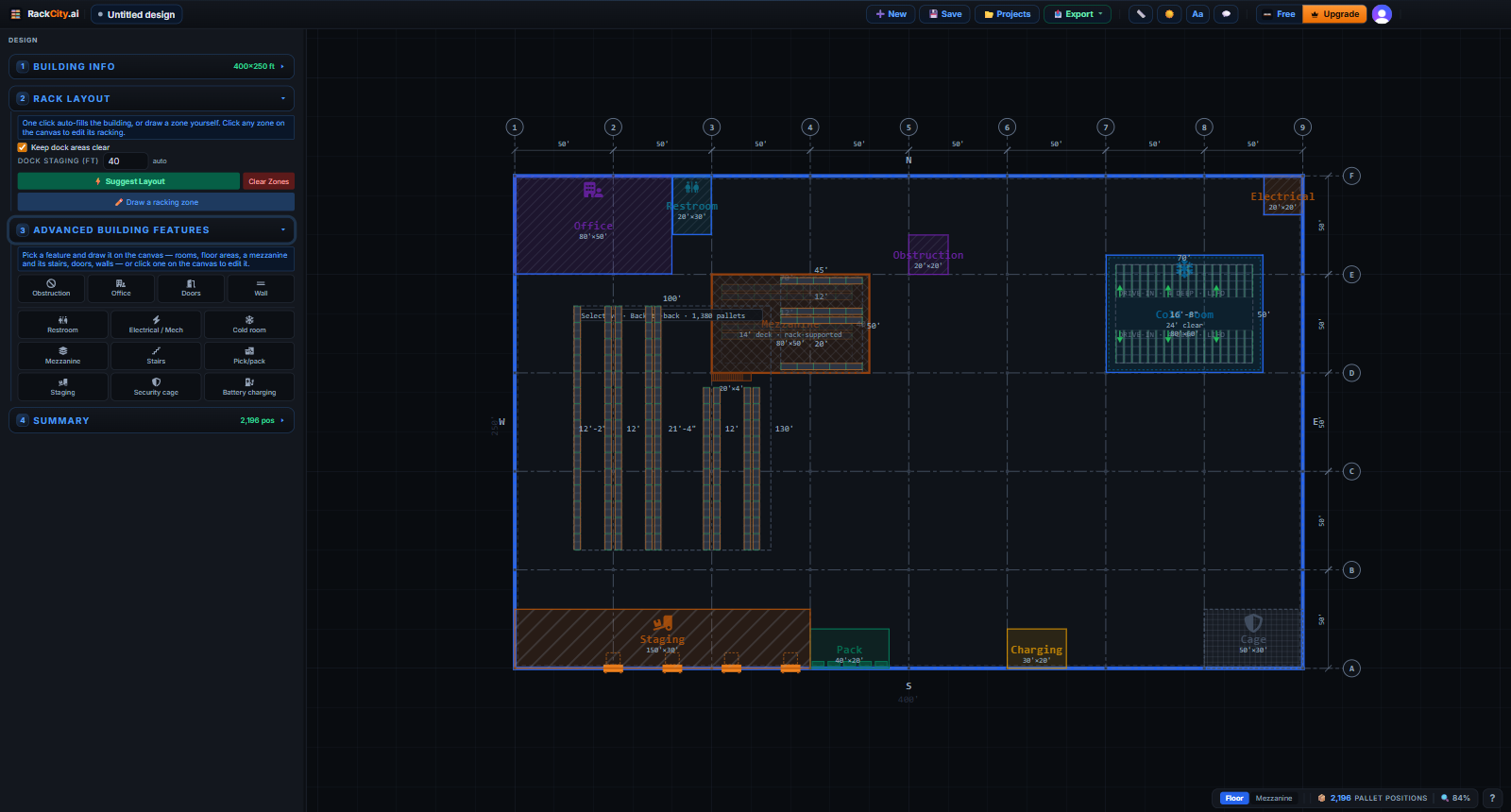
Once a design has a mezzanine, a Floor | Mezzanine switch appears on the canvas. On the Mezzanine level, a zone you draw stands on the deck as wide-span shelving, inside its edges; the floor fades behind it. Stairs lie along the deck edge they serve, the way stairs are built, and the Climbs toward setting turns them. Every zone's rack spec now shows its effective clear height — the building's, a cold room's ceiling, the underside of a deck above shelving — and warns when the frame or the top load would be over it.
The drawing set follows. A Building Features sheet lists every feature — label, type, size, area and what it means for the racking — with totals and a key; sheet 1 carries a features key beside the rack-type legend; a Mezzanine Level Plan sheet draws the deck and what stands on it; and each elevation card prints the clear height that type really has. Features print in black and white, told apart by their hatch pattern, so the set reads on any printer.
Forky AI knows the features too: "add stairs on the east side of the mezzanine", "a staging strip in front of the docks" or "four pack stations by the office" are built, not declined.
Upload a Drawing, Get the Racking
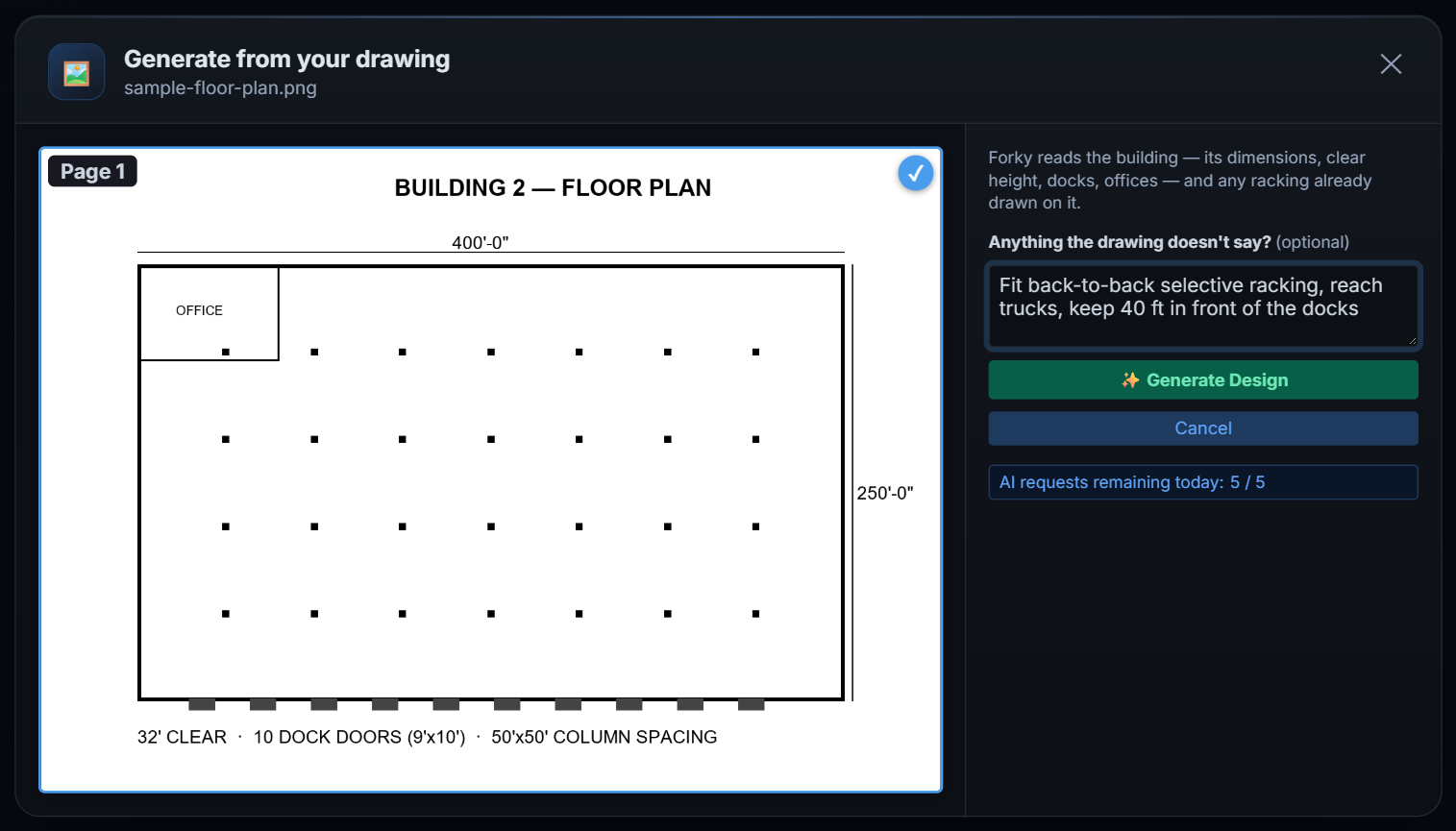
Drop a floor plan — a PDF, a photo or a screenshot — and RackCity AI reads it in one step. A one-page PDF or an image is ready to go the moment it lands; a multi-page PDF asks which pages to read. One note field asks for anything the drawing doesn't say: "fit selective racking · 32 ft clear · reach trucks · 2 offices".
The racking comes from where it belongs. Racking drawn on the plan comes back as zones — one per cluster of rows — with the beam, frame and aisle the sheet states, which is what you want for a re-rack or a takeover. Racking you ask for in the note is laid out in the same pass. And a plain floor plan comes back as the building, ready for a one-click fill.
A rack manufacturer's document with no building on it — a quote, a spec sheet, a load chart, a photo of the racks — is laid out too: in an assumed building sized from the quantities it quotes, with a reply that says what was assumed and asks for the real dimensions or the plan.
Forky AI in Your Language
Write to Forky AI in Spanish, German, Portuguese, Turkish or any other language and it answers in that language — following your latest typed message, so you can switch mid-conversation. A drawing uploaded with no note is answered in your browser's language. The design is the same whatever the language: the same rack, the same numbers, in the units you work in.

Signing up speaks your language too: the sign-up and sign-in panels follow your browser's language, in more than forty translations.
Smaller Improvements Worth Knowing About
- Suggest Layout (⚡) works on a racked floor. One press adds a zone beside the racking you already have, or offers a fresh layout you can take or keep yours — and it places on small rooms and odd shapes, keeps an aisle at a row end so a forklift can get in, and stages only in front of doors that are on a wall.
- Resize the building and the drawing follows. Doors, offices and zones on a moved wall move with it, and one undo restores both.
- The Material List opens priced. Every line is filled from the $ per pallet position target as it opens; change the target and press Fill prices to spread it again, or type your supplier's prices over any line.
- Forky AI answers faster — a new design comes back in about a third of the time it used to take.
- A trial you can cancel without losing it. Cancel during the 7 days for $0 and you keep the plan until they end; the plans panel shows the dates, and we email you a reminder 3 days before the first payment.
Update, October 2026: the next release shipped — v1.7.0 puts the app, its exports and Forky AI in 34 languages, saves your preferences to your account and starts metric designs in metric.
What's Next
Pallet rack on a mezzanine deck — the multi-tier pick module — is next in line, with pallet flow and mobile racking behind it. After that: supplier-backed component catalogs, so a quote names the vendor's own kit, and a vector plan sheet at a stated scale.
Frequently Asked Questions
Which building features keep racking out?
Offices, restrooms, electrical and mechanical rooms, stairs, obstructions, pick/pack areas, staging, security cages and battery charging keep every rack bay out. A mezzanine keeps pallet rack out but lets wide-span shelving stand under it or on its deck. A cold room is the other way round: racking goes inside it, at the room's own clear height, and only the bays its walls cross are dropped.
Can I put shelving on a mezzanine?
Yes. Switch the canvas to the Mezzanine level and draw a zone on the deck: it stands on the mezzanine as wide-span shelving, and the drawing set gets a Mezzanine Level Plan sheet. Shelving under the deck is drawn on the Floor level and takes the clear height under the deck. Pallet rack on a deck — multi-tier pick modules — is not drawn yet.
What happens when my drawing has no racking on it?
RackCity AI reads the building — walls, dock doors, columns, offices — and puts it on the canvas. Ask for racking in the note (for example "fit selective racking, reach trucks") and it lays it out in the same pass; otherwise one click on the follow-up chip racks the empty building.
Which languages does Forky AI answer in?
The language you type in. Forky AI follows your latest typed message, so you can switch mid-conversation; a drawing uploaded with no note is answered in your browser's language. The design itself is unchanged by the language — the same rack, the same numbers.
Are building features on the Free plan?
Yes. Every building feature, the Mezzanine level and the per-zone clear height are on every plan, Free included. The Building Features and Mezzanine Level Plan sheets print with the Layout PDF, which is on Solo (watermarked) and Warehouse Pro (clean).