In this guide
The Problem with Rack Quoting Today
A customer calls. They are about to sign a lease and want to know, roughly, what the racking will cost. They email you the flyer: 250 × 400 ft, 32 ft clear, docks along the south wall. Standard back-to-back selective, 8 ft beams, they think.
Then what? For most dealers, an hour in AutoCAD or a spreadsheet: sketch the rows, count the bays by hand, look up the price book, type up a quote. If the day is quiet you get back to them that afternoon. If it isn't, tomorrow.
By tomorrow they have a number from someone else, and yours is the one being compared to it.
RackCity AI, which we build, takes that hour down to about ten minutes, and the ten minutes produce more than the hour did: a floor plan, an elevation for each rack type, the bill of materials, and a Pricing Summary you can attach to the reply.
The RackCity AI Quoting Workflow
1. Upload the building flyer (or enter dimensions)
Drop the customer's PDF, or a photo of the plan, on the start screen, pick the plan page, and ask for the racking in the note ("back-to-back selective, 8 ft beams"). RackCity AI reads the building dimensions, the dock doors and, where the sheet shows it, the column grid, and drafts it in the same pass. You are editing a draft, not starting from a blank sheet. If the flyer is ambiguous — three units on one page, a footprint with a notch — type a note with the upload ("the 120,000 sq ft unit at the east end") and the reader uses it.
No flyer? Type the length, width and clear height, or describe the building to Forky AI in one sentence with the rack spec the customer mentioned. Either way you have a layout on screen in under a minute.
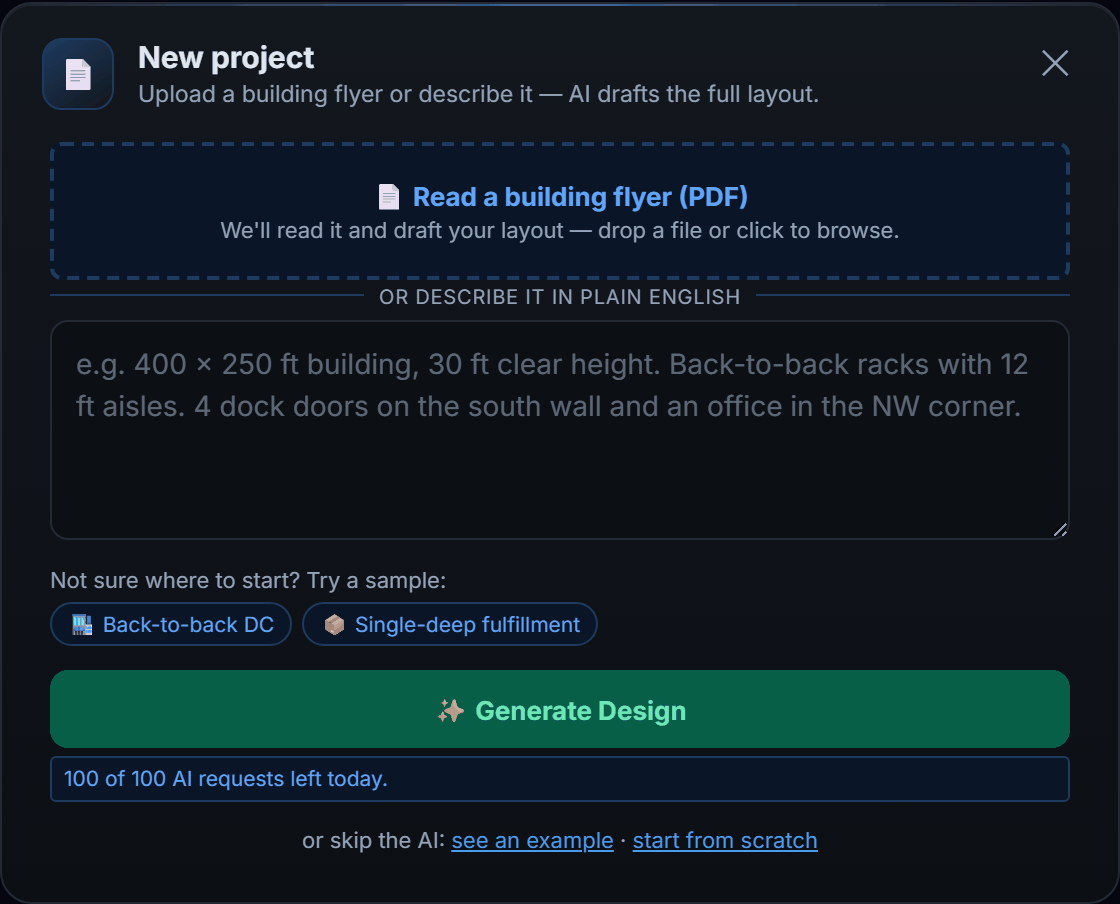
2. Adjust the layout for the customer's use case
The draft is a starting point. Set the aisle to the truck they run, the beam to the pallet they ship, and the rack type to the way their stock moves — selective where every SKU needs a face, double-deep where full pallets sit for weeks. Drag zones, remove the bays that hit a dock door, give one client's oversize crates their own 10 ft beams on the end bays. Or tell Forky AI: "make the back half double-deep and tighten the aisles to 10 ft." The pallet count on the header follows every change, so you always know the capacity you are quoting. Unsure which pattern fits their business? The layout examples show eight, with the reasoning.
3. Open the BOM and price your materials
Open BOM (Bill of Materials) from the Export button. The quantities are already there, counted from the drawing: frames by height, beams by length and level, wire decks, row spacers, anchors. The lines open priced from the $ per pallet position target; type your unit costs over them.
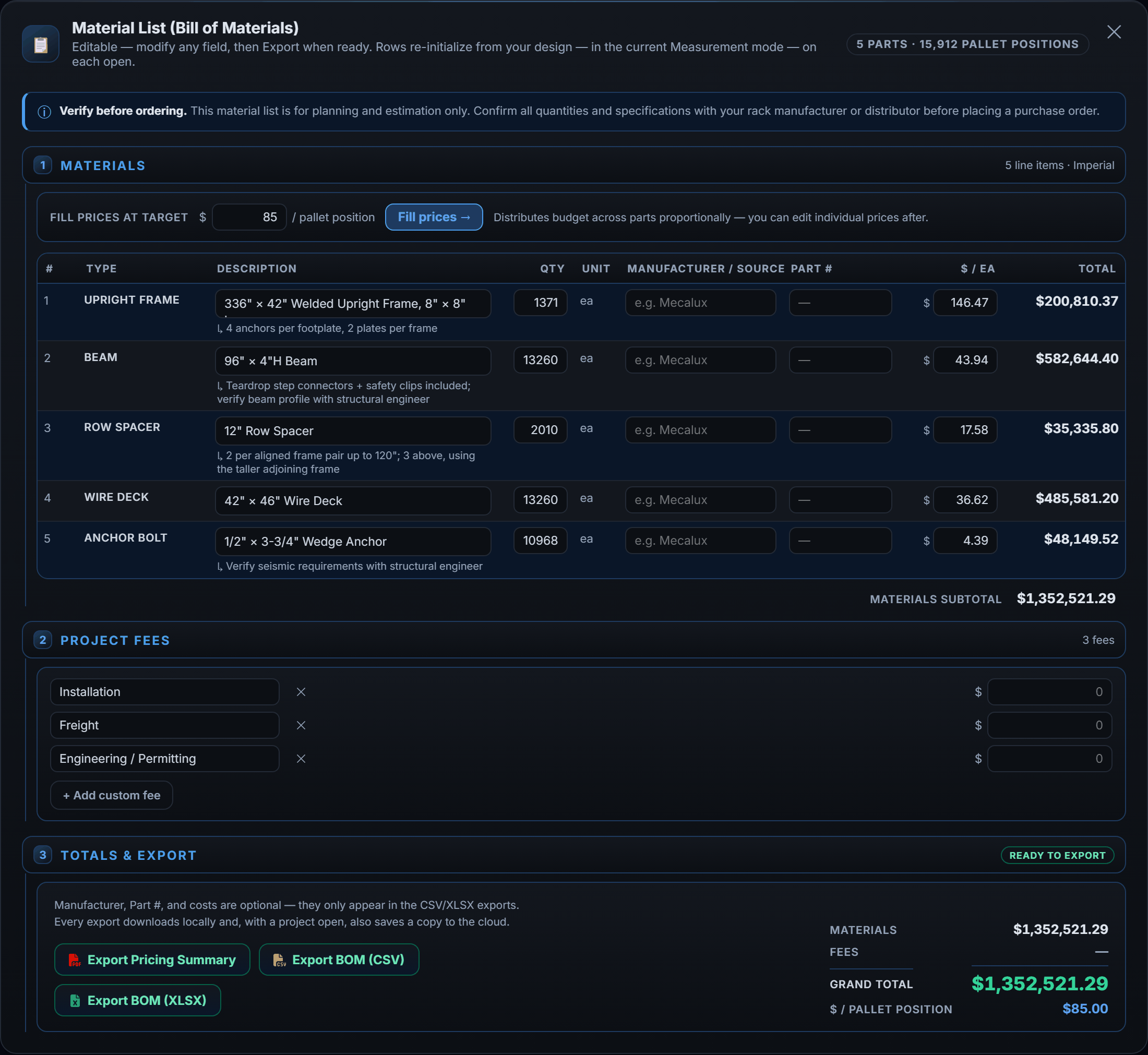
If the customer has named a budget, or you want to hit a market figure — $95 a position installed, say — use the $ per pallet position fill and let RackCity AI spread it across the lines. More on that below.
4. Add fee line items
Below the materials, the list carries the three fee rows every real quote has:
- Installation
- Freight
- Engineering / Permitting
Add custom fees for whatever the job needs — demolition of the old rack, column guards, seismic bracing, a lift rental. Every fee goes into the total and into the cost per position, so the number the customer compares is the whole number.
5. Generate the Pricing Summary
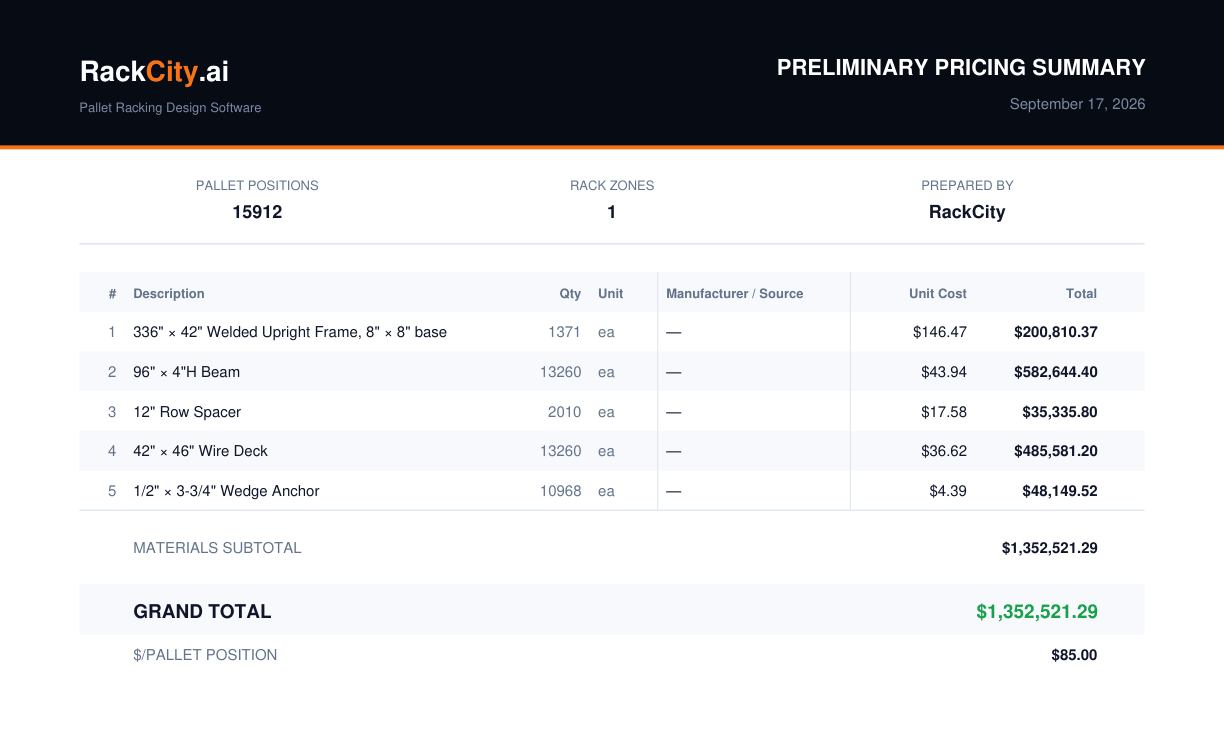
Click Export Pricing Summary. You get a portrait PDF on Letter or A4 (your Paper size preference) with the project name, the material list with quantities and prices, the fee lines, the total, and the cost per pallet position — downloaded to your machine and, with a project open, saved to that version. It carries a line saying every dimension and quantity must be field-verified before ordering, which is both true and the right expectation to set on page one.
6. Export the BOM for procurement
For purchasing or the ERP, export the same list as a CSV and import it without re-keying. For a person — the installer, the customer's facilities lead — export the Excel workbook, already formatted. Both sit beside the Pricing Summary on the project version, so the quote, the parts list and the drawing that produced them stay together.
What the BOM Includes
Five component families, each counted from the geometry of the layout rather than from a rule of thumb:
- Upright frames — one more than the bays in each row, grouped by height and depth. The footplate class follows the frame height, and so does the anchor count per plate.
- Beams — a pair per bay per level, at the bay's own length, so a row with two 10 ft bays on the end lists two beam lengths.
- Wire decks — matched to the beam length, one set per bay per level.
- Row spacers — for every frame pair in a back-to-back zone; none in a single row.
- Anchor bolts — per frame, from the footplate's anchors-per-plate.
Change the layout and the list changes with it — add a zone, drop a bay, go from four levels to five — and there is nothing to recount.
What the Pricing Summary Looks Like
A portrait Letter or A4 document, one page for most jobs and more for a large one, laid out so a buyer can read it without you on the phone:
- Header band — project name, date, the RackCity AI wordmark
- Summary strip — total pallet positions and the zone count
- Materials table — description, quantity, unit, unit cost, line total
- Fee rows — installation, freight, engineering, and your custom items
- Grand total — materials and fees together
- $ per pallet position — the total divided by the positions
- The field-verification note — quantities and dimensions to be confirmed on site before purchase
The $/Pallet Fill Feature
When you know the figure you need to land on — $80 a position for a price-sensitive tenant, $120 for a heavy-duty spec — type it into the $ per pallet position field and click Fill prices. RackCity AI works backwards to unit costs for every material line so the total hits your target.
The fill starts from a baseline ratio between the components — a frame costs more than a beam, a beam more than a deck — and scales all of them by one factor to meet the target. Every resulting unit cost stays editable, so when your supplier's real beam price comes in you overwrite that line and leave the rest.
This is what makes the "roughly what are we talking?" call answerable on the call. Building in, layout drafted, $95 a position, export the Summary: a credible number in the customer's inbox in under ten minutes, with the detailed pricing to follow once the spec settles.
Frequently Asked Questions
What does a pallet rack BOM include?
Upright frames by height and depth with their footplate class, beams by length and by how many levels each bay carries, wire decks matched to the beam, row spacers for every back-to-back pair, and anchor bolts per frame. RackCity AI counts all of it from the layout, so a changed bay changes the list.
How much does pallet racking cost per position?
Installed selective racking runs roughly $80–$160 per pallet position in the US in 2026. Used steel and light-duty jobs come in lower; double-deep and very-narrow-aisle systems, and anything tall enough to need heavier frames, come in higher. Height, beam capacity, decking, freight and local labour rates move the figure. The Pricing Summary shows it for your own quote directly.
Can I customize the Pricing Summary with my own pricing?
Yes. Every material line takes your own unit cost, the three standard fee rows take your numbers, and you can add custom fees. RackCity AI never imposes a price of its own — the $ per position fill is only a starting point you overwrite line by line.
What is the $/pallet position metric?
The total project cost — materials plus fees — divided by the pallet positions the layout holds. It is the number dealers and buyers compare proposals on, because it puts a big cheap layout and a small dense one on the same scale. A layout that holds more positions for the same total has the lower figure.
Does the quote include installation costs?
If you add it — Installation is one of the three fee rows in the Bill of Materials. It is included in the total and in the $ per position, and shown as its own line on the Pricing Summary so the customer sees materials and labour separately.
How much does pallet racking cost per square foot?
About $5–$12 per square foot of building for installed selective racking — but nobody in the trade quotes on it, because two buildings of the same size can hold very different numbers of pallets. Quotes are per pallet position ($80–$160 installed). A RackCity AI layout gives you both figures for the same building.