In this release
Pallet racking is sold in millimetres in most of the world and in inches in the rest, priced in forty currencies, and drawn by people who do not all read English. Until now RackCity AI was an English tool with a Metric switch: the numbers followed you, but the words, the exports, the formats and the defaults did not.
v1.7.0 is the release that makes RackCity AI a local tool wherever you are. The whole app speaks 34 languages, and so do the Material List, both PDFs and Forky AI. Your preferences are saved to your account — units, theme, language, how numbers and dates are written, which currency a quote is in and what paper it prints on — and follow you to any device. And a metric design is born metric: round metric numbers from the first click, and the SEMA and EN 15620 clearance, overhang, flue and lift-off rules checked as you build.
RackCity AI in 34 Languages
Open RackCity AI from a browser set to German and it opens in German: the toolbar, the sidebar and every inspector, Forky AI's dock, Preferences, Help, the plan wall and the pricing panel, every status line and every error. Automatic follows your browser's language; the Language preference picks one of the 34, and the app switches in place, without a reload. Only the language you read is downloaded.
The 34 are English, Spanish (Spain and Latin America), Portuguese (Brazil and Portugal), French, German, Italian, Dutch, Polish, Turkish, Czech, Slovak, Hungarian, Romanian, Croatian, Serbian, Swedish, Danish, Norwegian, Finnish, Greek, Bulgarian, Russian, Ukrainian, Hebrew, Arabic, Persian, Hindi, Thai, Indonesian, Malay, Vietnamese, Japanese, Korean and Chinese (Simplified and Traditional). Hebrew, Arabic and Persian lay the whole app out right to left — the sidebar on the right, the canvas on the left, the chat reading the way the language does.
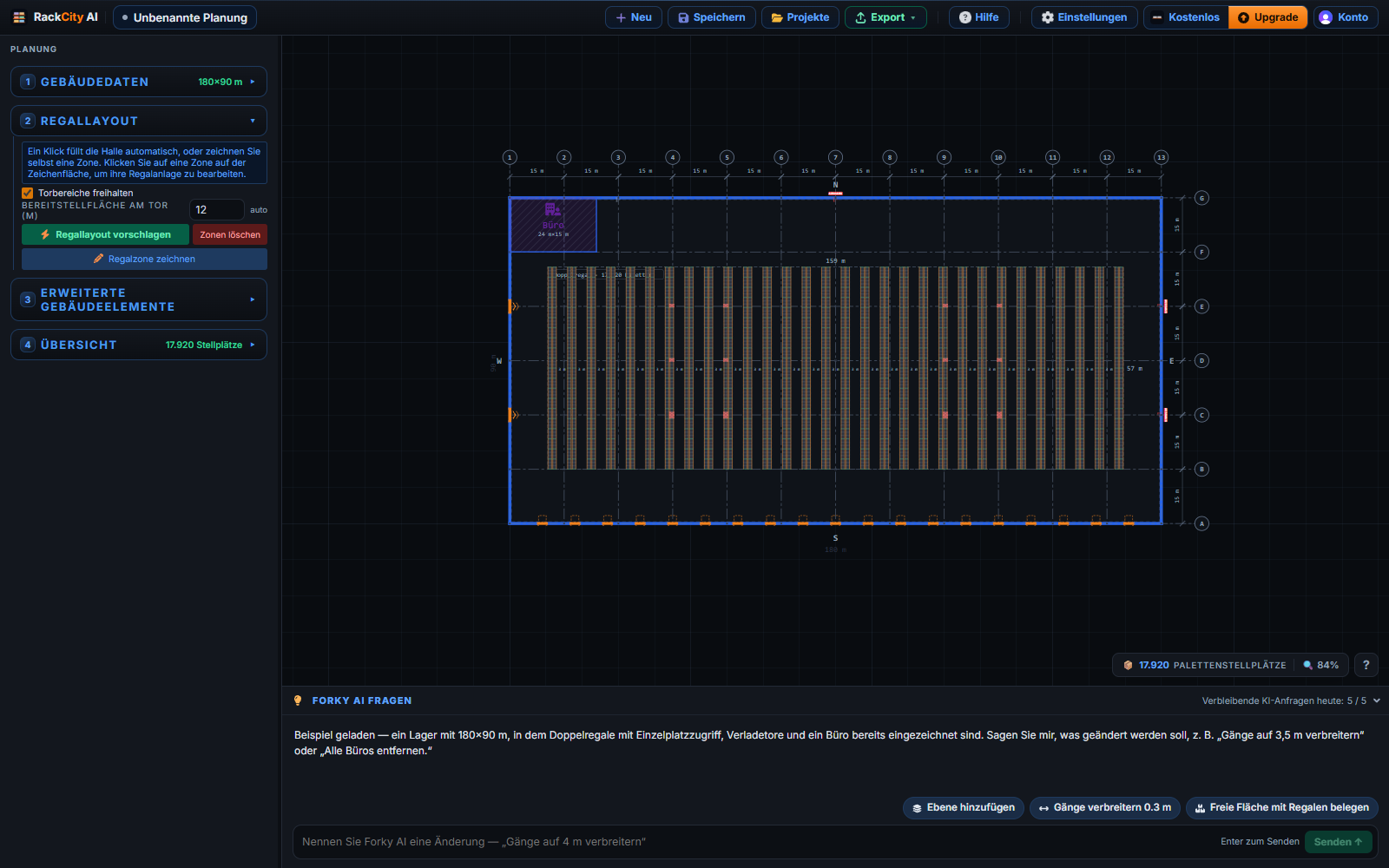
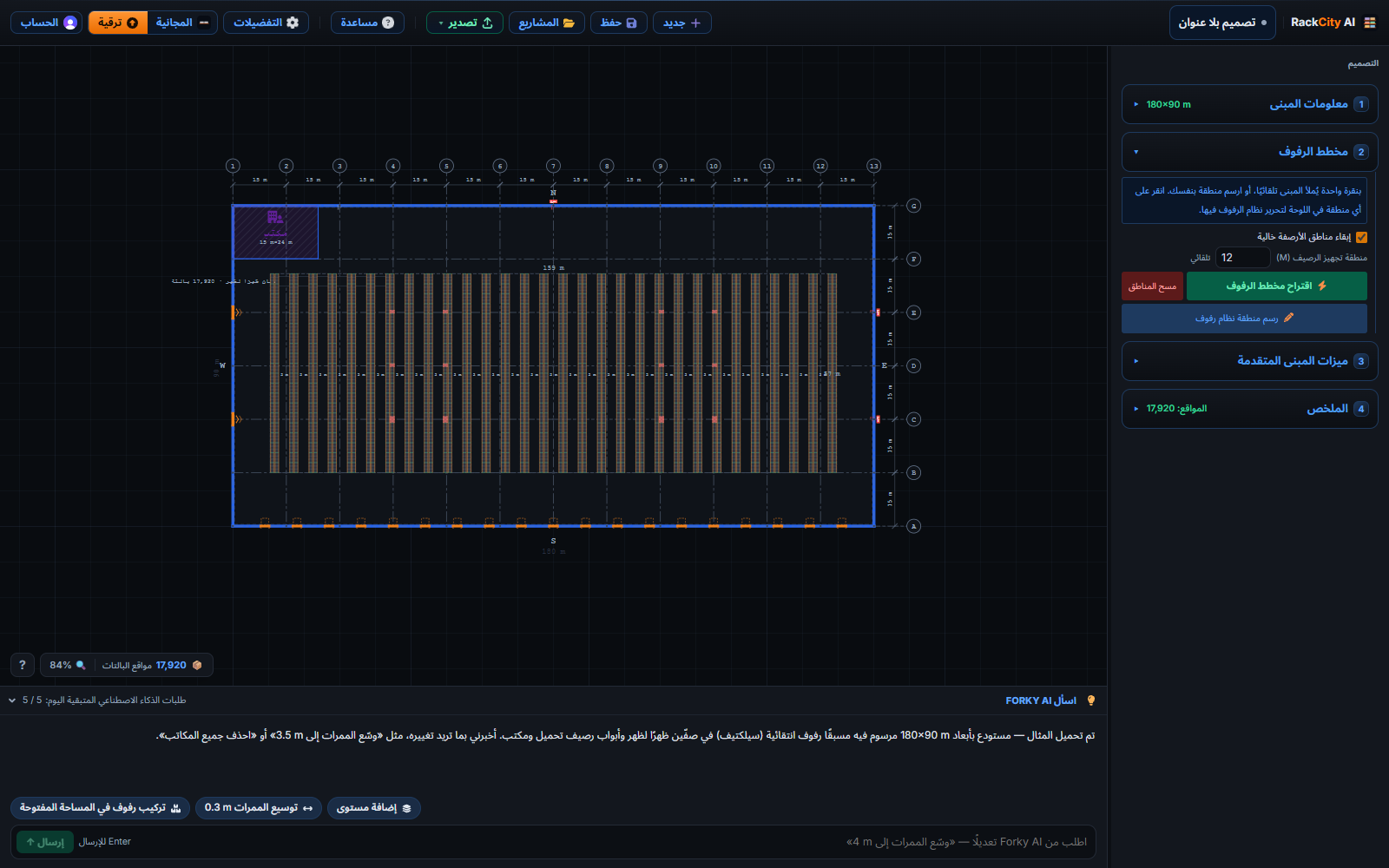
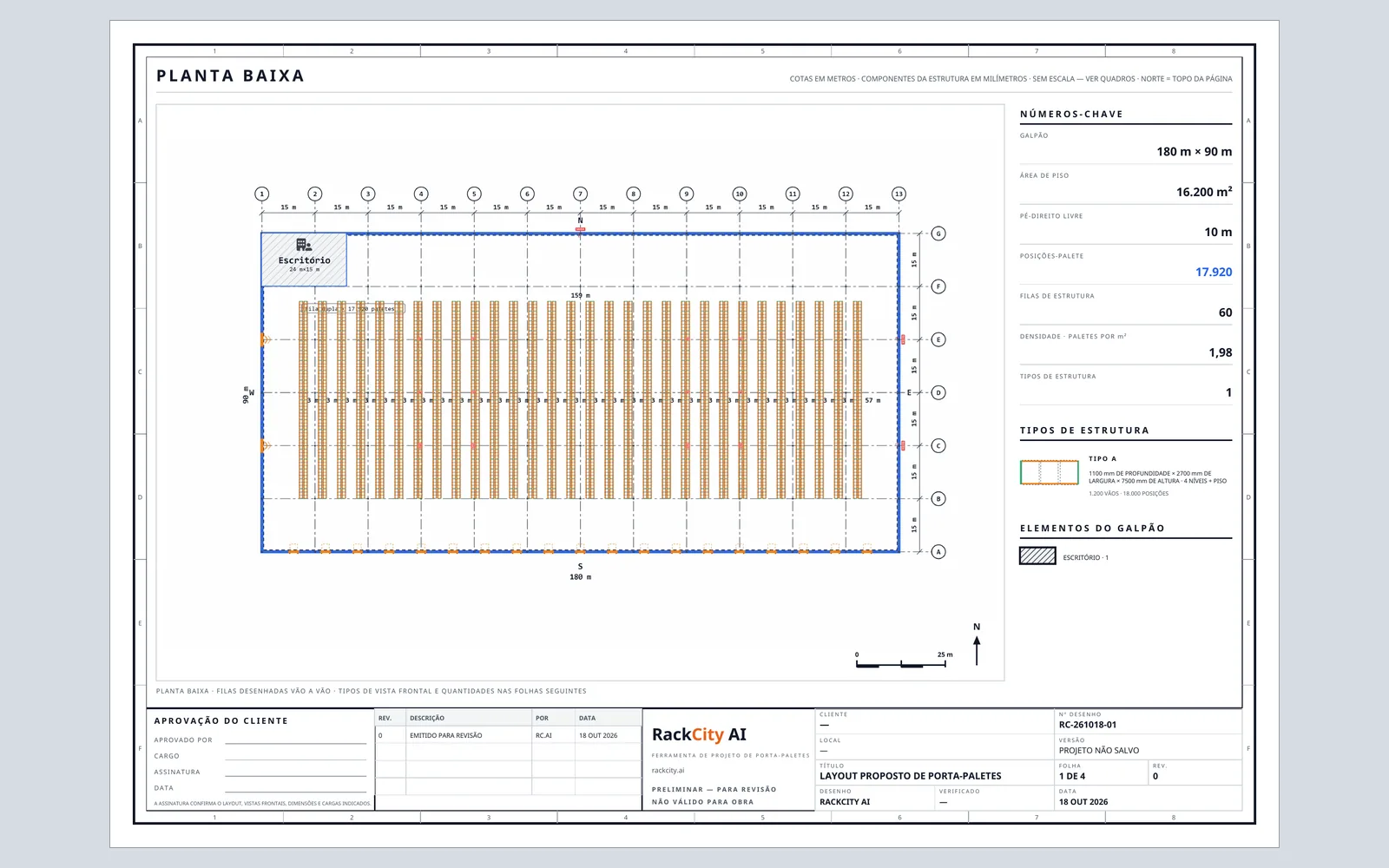
What you export follows. The Material List, its CSV and XLSX, the Layout PDF and the pricing summary PDF print in your language. The PDFs print 29 of the 34 — every Western and Central European language, Greek, Cyrillic and Vietnamese, and Hebrew, Arabic and Persian right to left with the letters joined; for Hindi, Thai, Japanese, Korean and Chinese they print in English for now, and the Export menu says so before you export. Checkout, the billing portal, receipts and invoices open in your language too, wherever Stripe has it.
Forky AI already answered in the language you typed. Now a chosen language outranks the typed one: with a Language preference set, Forky AI replies in it even when you paste a spec in another language; on Automatic it still answers in the language you write. An office or a staging area it draws is labelled in your language too, and a design it drafts for a Metric user is stated in metres, millimetres and kilograms even when the request names no units.
The whole picture — every language by name in its own script, which ones the PDFs print, the units, the 39 currencies a quote can be priced in, and the same plan sheet printed in each of the 29 PDF languages — is on one page: rackcity.ai/international-support.
Preferences That Follow You
⚙ Preferences on the toolbar holds seven settings — Measurement (Imperial or Metric), Theme (Light, Dark or System), Language, Numbers (1,234.5 · 1.234,5 · 1 234,5 · 1'234.5), Dates (10/14/2026 · 14/10/2026 · 2026-10-14), Currency and Paper size (Letter or A4). Every change saves the moment you make it — the window says so, Saved to your account — and is in place before the app loads on any device you sign in on; the newest change wins. Choices you make as a trial visitor carry into the account you create.
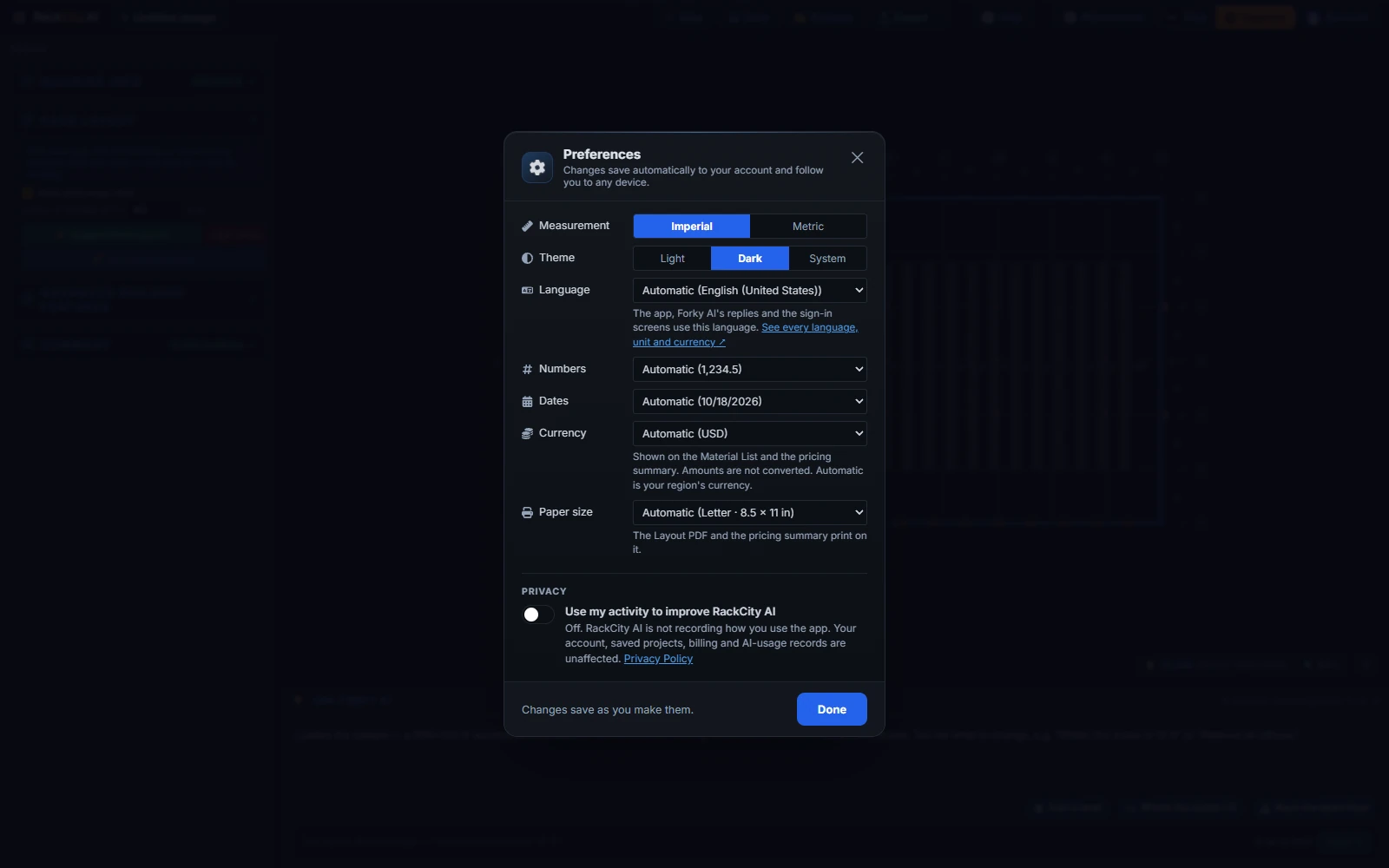
Anything you leave on Automatic follows your region — the region your browser's language names, else your location. A UK browser gets metric and pounds sterling wherever it is; a German one metric and euros; a US one imperial, US dollars and Letter paper; a Brazilian one metric, reais and A4. Numbers and dates take the language's own format.
Numbers, dates and money read your way across the app, the Material List, its exports and the pricing summary. Amounts are relabelled, never converted: your prices stay your prices. Every currency wears the sign its own country writes — $ for every dollar and peso, £, €, ₺, ₹, ₩, ₱, ฿, ₫, ₪, zł, Kč, ¥ — and because nine currencies share "$", the pricing summary and the Material List now say which one every amount is in: Amounts in CAD · Canadian dollars. Forky AI works in your currency too, and a drawing or quote in another currency is called out as such.
Paper size is the seventh setting. The Layout PDF and the pricing summary PDF print on the paper you pick; Automatic is Letter in the US, Canada, Mexico, the Philippines and the Letter countries of Latin America, and A4 everywhere else. On A4 the drawing set keeps every sheet, title block and schedule.
The first time an account signs in on a browser, a note under ⚙ Preferences says what was read from the browser — Metric · English (United Kingdom) · GBP — and points at the button, so a wrong guess is one click from right. And the Account pill opens straight into your account, with Plan & billing and Preferences beside your profile.
Metric by Default, With the Standards
Metric mode used to paint imperial defaults in metres: a new building was 182.88 × 91.44 m, a frame 1067 mm, an aisle 3.66 m. In Metric, every way into a design now starts on round metric numbers. Start my own opens a 180 × 90 m building with 10 m clear height, 0.5 m wall clearance and a 15 × 15 m column grid, racked with 1100 mm frames, 2700 mm beams, a 7500 mm frame with four beam levels, 800 × 1200 mm pallets at 75 mm, 3.0 m aisles, a 4.0 m tunnel and 1,000 kg a position. The sample layout is redrawn in round metres, the drawing tools start metric (150 mm office walls, a 3.5 m mezzanine deck, 1.2 m stairs), and a design Forky AI drafts for a Metric user takes the same values wherever it leaves one out — and never writes inch or foot hardware. Suggest Layout keeps its dock staging in 0.5 m steps and narrows an aisle 3.0 → 2.7 → 2.5 m. Imperial is unchanged, and a saved design keeps every value it had.
The rules a European rack engineer checks are checked for you, in both modes:
- One clearance per gap (SEMA / EN 15620). The pallet clearance is the gap between any two neighbours on a beam — pallet to pallet and pallet to upright — rather than a clearance on each side of every pallet. Metric pallets take 75 mm (EN 15620's X3 = X4, SEMA's minimum); imperial pallets keep 3 in. Every catalog bay holds what it held, three Euro pallets fit a 2700 mm beam exactly, and the metric beam list gains the 1825 mm UK bay. A Pallet clearance row in the Loads group edits the gap, and Forky AI counts pallets per beam the same way.
- Pallet overhang and the flue (SEMA). The Frame depth row warns when a pallet hangs further past each beam than the design allows — a 1200 mm pallet wants an 1100 mm frame, a 48 in pallet a 42 in frame — and when a pallet is too shallow to reach the rear beam. A Pallet overhang row sets the allowance (50 mm on a metric design, 3 in on an imperial one), and the flue warning counts it: what the flue leaves between back-to-back loads must clear SEMA's 100 mm or NFPA 13's 6 in.
- Lift-off by beam height (EN 15620). The Load height row says Tight when a level fits the floor but not the lift-off a forklift wants at that height — 75 mm under a 3 m beam, 100 mm at 6 m, 125 mm at 9 m, 150 mm at 12 m. It is a note, never a rejection, and every level of an existing design stays as it was. A new design now starts on a 24 ft frame with four beam levels (7500 mm and four in Metric), five pallets high, the frame dealers quote most.
- Column width. A new Column width row in the Frame group sets the upright's face along the row — 3 or 4 in, 75 / 90 / 100 / 120 mm in Metric — and the 2D elevation, the 3D bay, the drawing sheets and the Material List all draw and name the same width.
Three things metric users told us about are put right in the same release. Forky AI's edits keep your measurements: an edit used to replace the whole design, so a value Forky AI left out of its answer fell back to the imperial default — on a metric design, "move the office" could turn 1100 mm frames into 42 in. Every measurement it was shown and left out now keeps its value, in both modes, and lengths stored in whole millimetres stay exact through its answers. "2,7" is 2.7: a number typed with a decimal comma was read as 2; every number field now reads both separators the way your Numbers setting writes them. And the Material List's anchor bolts are metric in Metric — M12 × 95 mm wedge, M12 × 110 mm cantilever, M10 × 75 mm wide-span — where every mode used to read 1/2" × 3-3/4".
Smaller Improvements Worth Knowing About
- The Material List CSV opens in columns in European Excel. With a 1.234,5 / 1 234,5 / 1'234.5 Numbers setting the CSV is separated by ";" and its amounts use your decimal, so Excel reads them as numbers.
- The Material List's price fill starts at 100 per position — a round number to adjust from in any currency; the strip says it is a starting point, not a quote.
- Your design is saved when Checkout opens. Unsaved work is stored on its own while Stripe is in the other tab, so the way back from Checkout finds the design, not an empty app.
- Dropdowns and scrollbars follow the theme — no more white select lists popping up in dark mode.
- The consent question waits for your first design. Where usage recording starts off, the question comes a few seconds after your first design is on the canvas, not the moment the app opens; nothing is sent until you answer, and Not now puts it off until a later visit.
- The pricing cards say "No watermark" on Warehouse Pro's Exports line, in the app and on rackcity.ai/pricing.
Frequently Asked Questions
Which languages does RackCity AI work in?
Thirty-four: English, Spanish (Spain and Latin America), Portuguese (Brazil and Portugal), French, German, Italian, Dutch, Polish, Turkish, Czech, Slovak, Hungarian, Romanian, Croatian, Serbian, Swedish, Danish, Norwegian, Finnish, Greek, Bulgarian, Russian, Ukrainian, Hebrew, Arabic, Persian, Hindi, Thai, Indonesian, Malay, Vietnamese, Japanese, Korean and Chinese (Simplified and Traditional). Automatic follows your browser; the Language preference picks one, and the app switches in place. Hebrew, Arabic and Persian lay the whole app out right to left. The full list, with every unit and currency, is at rackcity.ai/international-support.
Do the Layout PDF and the Material List print in my language?
The Material List and its CSV and XLSX follow your language in every one of the 34. The Layout PDF and the pricing summary PDF print in 29 of them — every Western and Central European language, Greek, Cyrillic, Vietnamese, and Hebrew, Arabic and Persian right to left with the letters joined. Hindi, Thai, Japanese, Korean and Chinese PDFs print in English for now, and the Export menu says so before you export.
Are my preferences saved across devices?
Yes. Measurement, Theme, Language, Numbers, Dates, Currency and Paper size are saved to your account the moment you change them and are in place before the app loads on any device you sign in on; the newest change wins. A setting you leave on Automatic follows your region: a UK browser gets metric and GBP anywhere, a German one metric and EUR, a US one imperial, USD and Letter paper. Choices you make as a trial visitor carry into the account you create.
Does Metric by default change my existing designs?
No. A saved design keeps every value it had, in either mode. The round metric numbers are what a new design starts on in Metric — Start my own, the sample layout, the drawing tools and a design Forky AI drafts for you — and the new 75 mm pallet clearance keeps every catalog bay holding what it held. The lift-off note on a tight level is a note, never a rejection.
Is any of this limited to a paid plan?
No. Every language, every preference, the metric defaults and the SEMA and EN 15620 rules are on every plan, Free included, with a limited number of AI requests on Free. The Layout PDF and the pricing summary PDF, in whichever language and on whichever paper, are the exports Solo (watermarked) and Warehouse Pro (clean) add.