In this guide
The Typical Rack Dealer Sales Cycle
A pallet rack sale runs through five stages: the inquiry, the site walk, the layout and quote, the revision rounds, and the close with its handoff package. That sequence has not changed in thirty years. What has changed is how long the customer is willing to wait between stages.
A tenant evaluating a building used to expect a proposal in three to five working days. Now they are comparing you with a dealer who showed them something the same afternoon — and once they have seen one drawing, every dealer without one is behind. If your process still runs through a CAD drawing, an Excel count and a Word template, you are competing against that expectation with a handicap the tools impose, not you.
We build RackCity AI, so this guide is written around it; the point holds for any tool that puts a layout and a number in front of the customer at each stage. It doesn't replace what you know about racking. It shortens the distance between what you know and what the customer sees.
Stage 1: The Initial Inquiry
The situation: a customer calls about a building — a spec warehouse they are touring, or a unit next door they might expand into. They give you what they have: 300 × 500 ft, 30 ft clear, they think back-to-back selective. They want a feel for the number before they commit to a lease.
What most dealers do: take notes, promise to get back to them, and draft something after the next call. The customer rings two other dealers in the meantime.
What you can do instead: open RackCity AI while they are still talking and give Forky AI the brief — "300 × 500 ft, 30 ft clear, back-to-back rows with 12 ft aisles, 8 ft beams, 4 levels". The layout is on screen with a pallet count in under a minute. Read them the number before they hang up: "Based on what you've described, you're looking at about 2,800 positions with standard back-to-back at four levels." That is a different call from the one the other two dealers had.
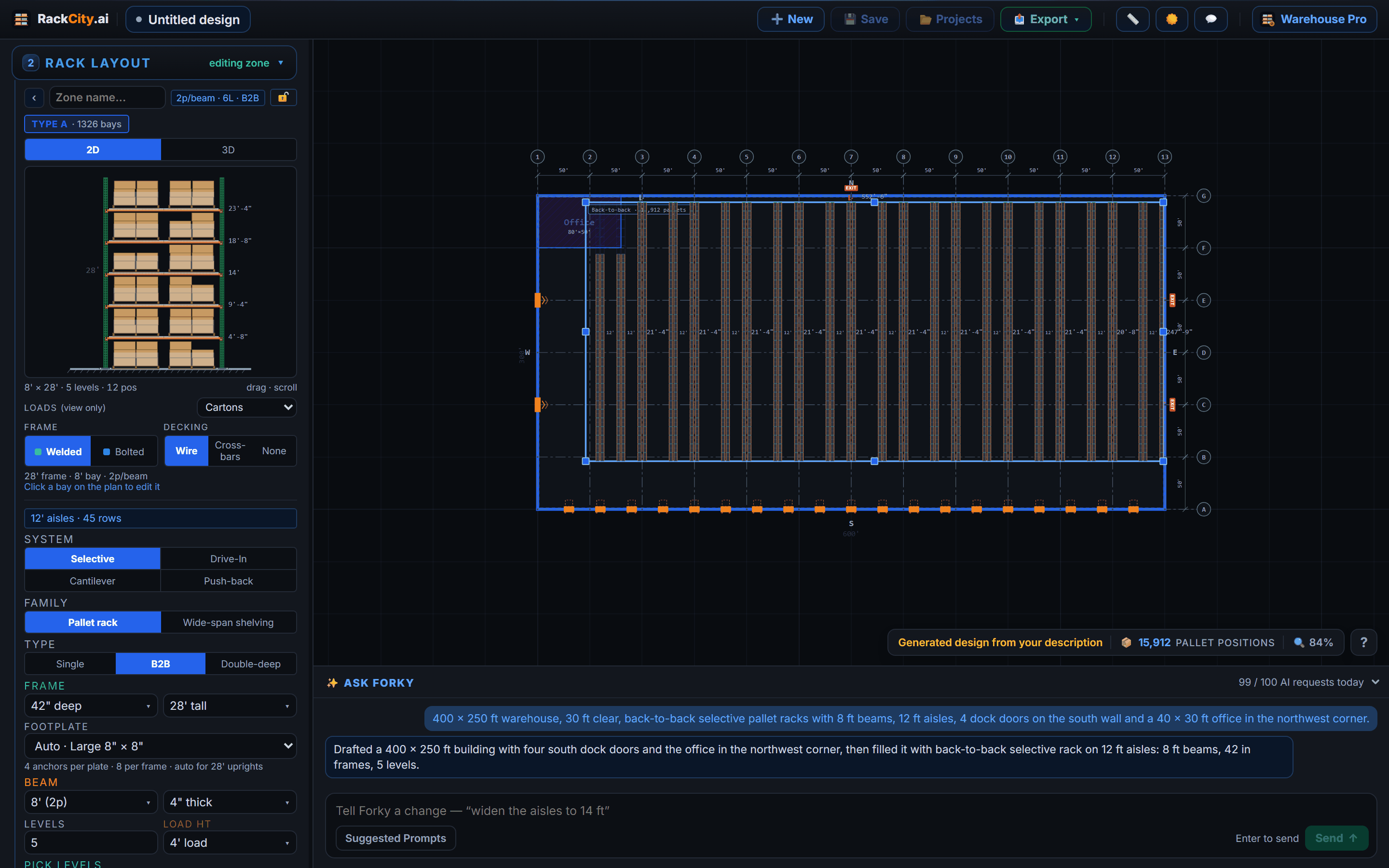
You have committed to nothing. You have anchored the conversation on a real figure and shown you can produce one on demand, before you have seen the building. The customer now has a number to hold the other quotes against — yours.
Stage 2: After the Site Walk
The situation: you have walked the building, or the customer has sent the marketing flyer with the dimensions, the clear height, the column grid and the dock positions. Now the layout has to respect the real building: the columns, the doors, the office in the corner.
What this used to take: thirty to ninety minutes in CAD — tracing the outline, placing rows, counting bays, marking where a column or a door breaks a run.
What RackCity AI does instead: drop the flyer on the start screen, pick the plan page, say what to rack in the note, and the building and a first racking layout come back — dimensions, docks, columns where the drawing shows them, zones, bays, positions. If the sheet is thin on detail, type what you measured and let the reader fill the rest; if it shows three units, say which one.
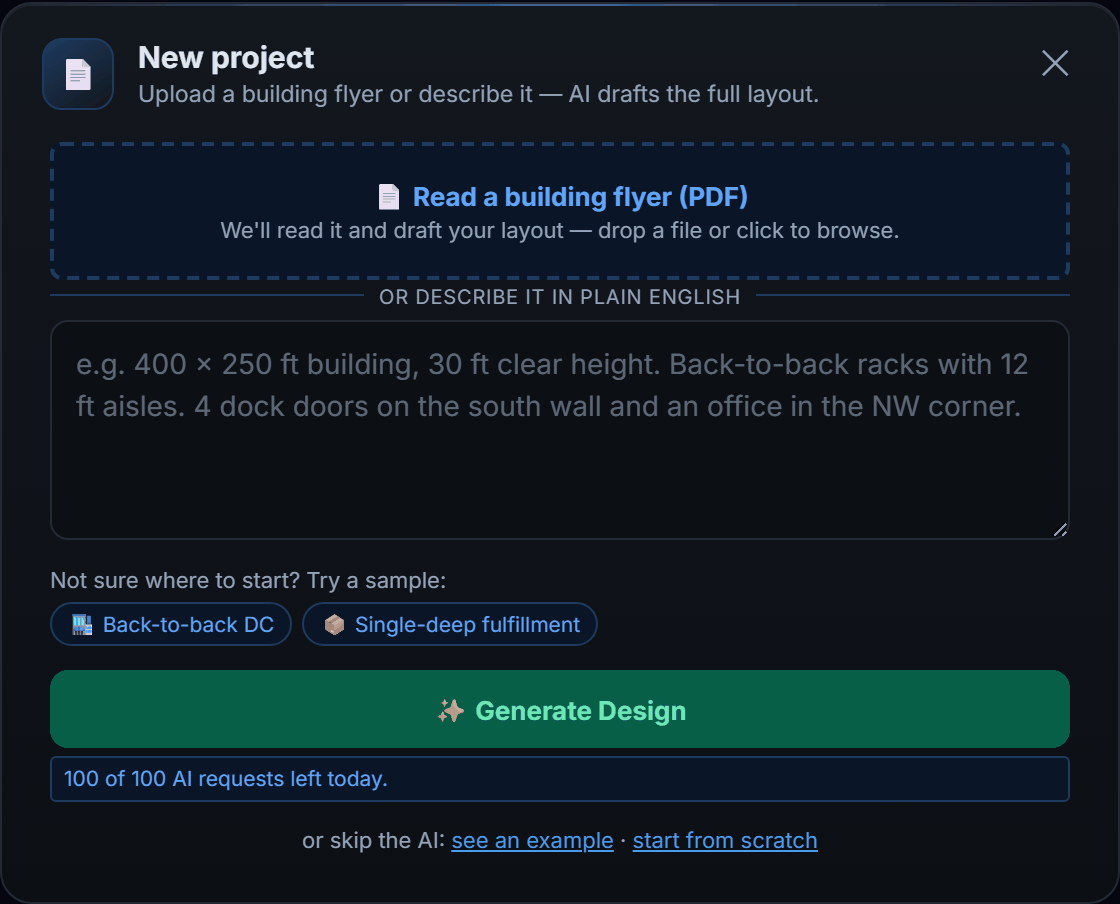
Then the second pass, which is where your judgement earns its keep: pull the rows onto the column grid so the columns bury in the flue, drop the bays a dock door makes unusable, set the aisle to the truck the customer actually runs, give the odd oversize pallet its own bays. Five to ten minutes, not an hour. For the patterns that fit a 3PL, an ecommerce floor or a cold store, the layout examples show eight with their reasoning.
On a site walk with a laptop, type the measurements as you take them and the customer can see a layout and a position count before you leave the building. A number at the end of the walk, rather than three days later, is the moment most deals tip.
Stage 3: The Quote
The situation: the customer likes the layout. Now they want the number, and it has to be a number you can stand behind.
Open BOM (Bill of Materials) from the Export button. The list is already counted from the drawing: frames by height and depth, beams by length and level, wire decks, row spacers for the back-to-back pairs, anchors per frame. The lines open priced from the $ per pallet position target; type your unit costs over them, add the fee rows — installation, freight, engineering and permitting, anything else the job carries — and export the Pricing Summary. If you need to land on a market figure first, change the target cost per pallet position and press Fill prices to spread it across the lines; the real prices overwrite it as they arrive.
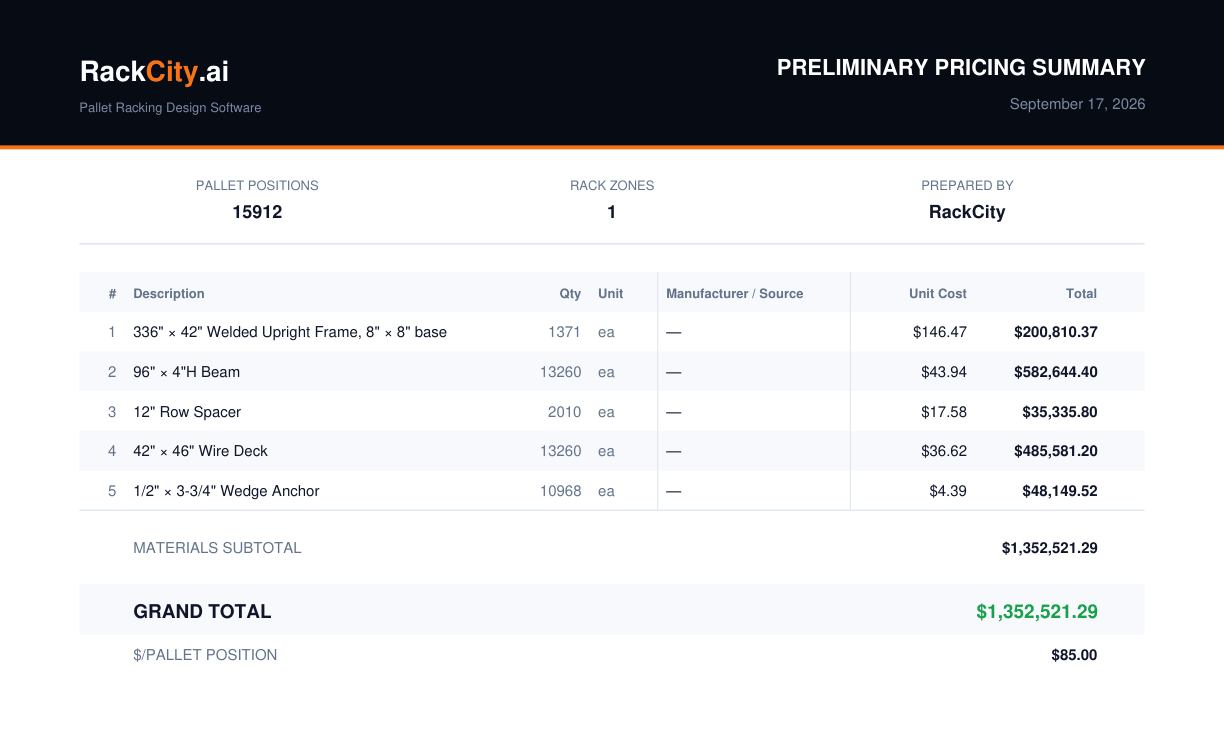
The summary states on its face that quantities and dimensions must be field-verified before ordering. That is the right framing for a pre-order proposal: it tells the customer this is an estimate from a layout, not a certified take-off, and it makes the site verification — with you — the obvious next step.
Stage 4: Revision Cycles
The situation: the customer comes back with questions. Could we add a zone along the north wall? What does five levels do instead of four? What is the price difference on 9 ft beams?
With the old tools every question is a half-hour: redraw, recount, re-key the spreadsheet, rebuild the PDF. So dealers answer two questions and hope the third doesn't come.
In RackCity AI each one is a minute. Change the levels, the beam length or the zone; or ask Forky AI — "make the north zone five levels" — and the count and the bill of materials follow. Export the Pricing Summary again. Then Save as new version, so the four-level and the five-level layouts sit side by side in the project with the quote each one produced, and the customer's "which one was the cheaper option?" is a click, not a search through your sent mail.
Fast revisions change the shape of the sale. A customer who gets three considered options from you in an afternoon is making a decision between your options. A customer still waiting a week for the first drawing is making a decision between dealers.
Stage 5: Closing and Handoff
The situation: the customer is ready. They need three things: something for the landlord, something for the permit, and something for the crew.
All three come out of the same project:
- Layout PDF — floor plan — the dimensioned top-down drawing with the zones, rows, aisles, doors and the position totals. It goes into the landlord's fit-out approval and the general contractor's coordination set.
- Layout PDF — elevation drawings — in the same file, an elevation per rack type with frame heights, beam levels and loads. The permit engineer starts from it; the installation crew works from it.
- BOM as CSV or Excel — the full list, saved on the project version beside the PDFs, ready for purchasing or the ERP without re-keying.
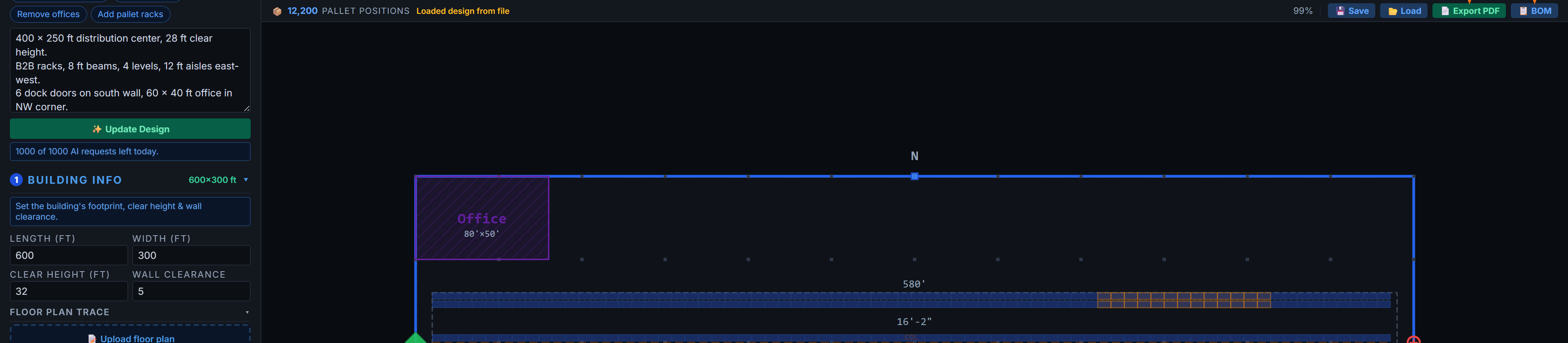
The job closes and the package goes out in the same conversation. Nobody is chasing drawings after the fact, and the version the customer signed off is the version in the project.
The Compounding Advantage
No single faster quote is the point. The point is what happens across a quarter of them.
When a revision costs a minute you run more of them, and every one keeps the customer in your layout instead of a competitor's. When you can quote a building on the phone you qualify the real opportunities in the first call. When you arrive at every meeting with a drawing already drafted, the meeting is about your drawing. The advantage is not that each step is quicker; it is that you get to take more of them than the dealer across town.
That dealer isn't slow because they are bad at the job. They are slow because their tools make them slow. The gap is there to be taken.
Every Pricing Summary carries the line that quantities and dimensions are estimates to be field-verified before ordering. It is not only legal cover. It is the honest description of a pre-order proposal, it protects you if the field count differs from the drawing, and it puts the site verification — with you present — on the customer's calendar.
Frequently Asked Questions
How long does it take to quote pallet racking?
About ten minutes from a building flyer to a layout, a bill of materials and a Pricing Summary in RackCity AI. The same job by hand in CAD and a spreadsheet takes thirty to ninety minutes — and every revision costs most of that again, which is why the difference shows up in close rate rather than in any one quote.
What software do rack dealers use?
Most run three tools: AutoCAD or a vendor's configurator for the drawing, Excel for the count and the price, and a Word or PDF template for the quote. RackCity AI replaces all three for the design-and-quote stage — the layout, the material quantities and the Pricing Summary come from one drawing. The engineer's stamped set still follows for the permit.
Can I use RackCity AI on a customer site visit?
Yes. It runs in the browser on a laptop, so you can type the measurements you just took, draw the layout and show the customer the position count before you leave the building.
Does RackCity AI generate permit drawings?
It generates the dimensioned floor plan and an elevation drawing per rack type, which is what a permit pre-application and the engineer both start from. The stamped drawings most jurisdictions require for racking over 8 ft still come from a licensed structural engineer — RackCity AI hands them a dimensioned layout instead of a sketch, which shortens their side too.
How do I handle revision requests from customers?
Change the levels, the beam, the aisle or the rack type — or ask Forky AI to — and the count and the bill of materials follow; export the Pricing Summary again. Save each option as a new version of the project, so the customer's alternatives stay side by side with the quotes they produced instead of scattered through your sent mail.