In this release
If v1.1 was about making RackCity AI smarter, v1.2 is about getting work out of it. The whole export path was rebuilt around a single button, a proper Excel bill of materials joined the lineup, and your files now land where you'd expect them to — in your downloads folder. Alongside that, the workspace got a cleaner frame and the app stopped leaving you guessing while things load.
Improved Exports, Starting With Excel
Three changes here, and together they cover most of what people actually do at the end of a design session.
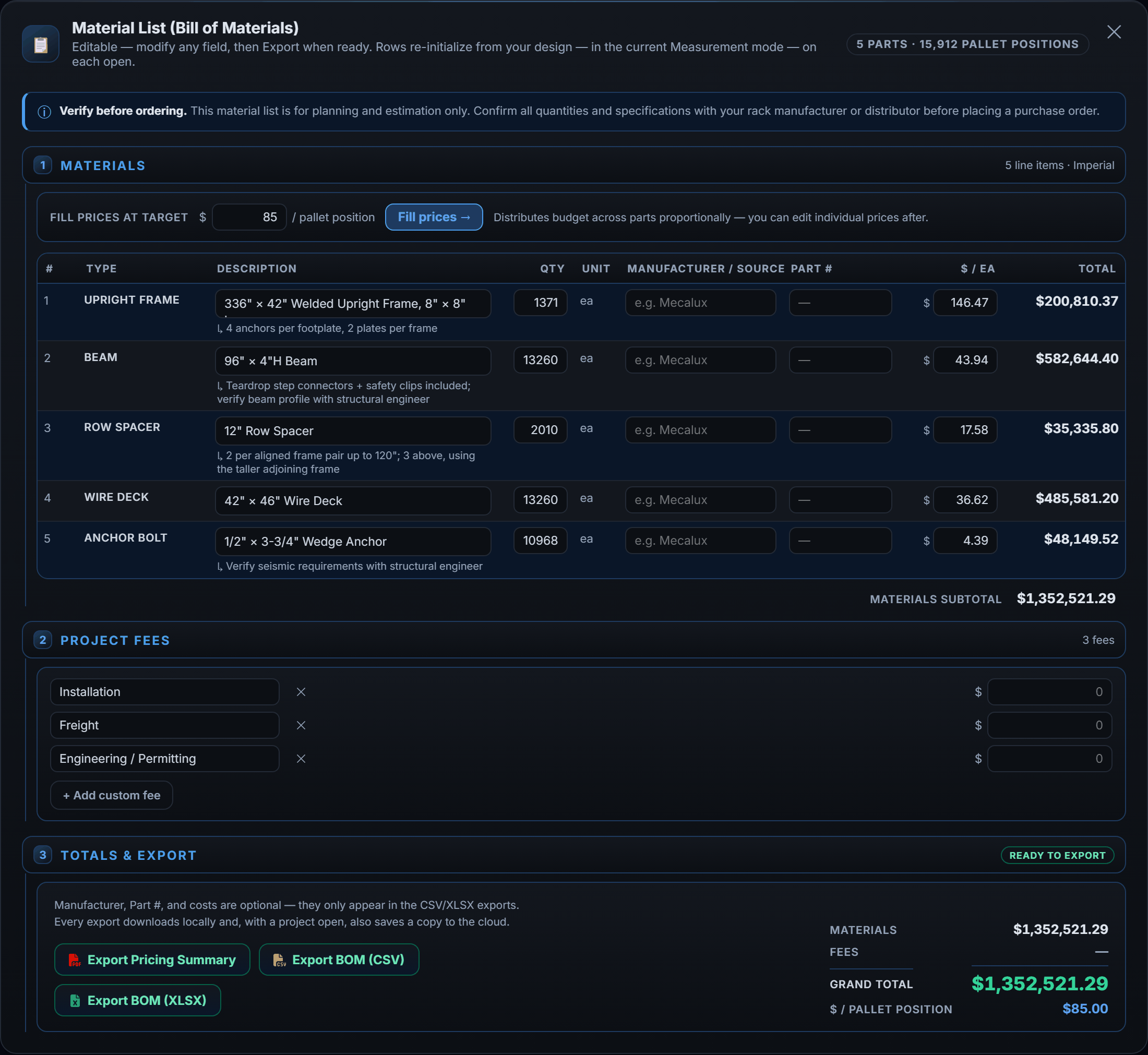
A styled Excel bill of materials
RackCity AI has always given you a BOM as a CSV. CSV is fine for importing into another system, but it's a poor thing to hand a client or a purchasing manager — no formatting, no column widths, no visual separation between materials and fees.
v1.2 adds a proper Excel (.xlsx) export alongside it. It's a formatted workbook: your material list with quantities and unit costs, your fee line items, and the grand total, all laid out and ready to send. The CSV isn't going anywhere — pick whichever fits what you're doing.
One Export button
Exports used to be scattered across the toolbar as separate buttons. They're now consolidated into a single green Export dropdown — Layout PDF, BOM CSV, BOM Excel, and the Pricing Summary all in one place. One less thing to hunt for, and it makes it obvious at a glance what RackCity AI can produce for you.
Files download to your computer
This is the change most people will notice first. Previously an export was saved to your cloud project, and you went to the My Projects viewer to retrieve it. Now every export downloads straight to your browser the moment you generate it — the way a download is supposed to work.
You don't lose the cloud copy. If you have a project open, RackCity AI still attaches the file to that project version, so your full export history stays intact and you can re-download any of it later. You just don't have to make a round trip to get the file you generated ten seconds ago.
A Refreshed Workspace
The app's frame got tidied up. The sidebar now leads with the RackCity AI wordmark and a project pill — so the project you're working in is always visible instead of something you have to remember. The rail logo was rotated to line up with the vertical wordmark, and the persistent footer strip along the bottom of the canvas is gone.
Losing the footer gives the canvas a little more room, which matters on a laptop. The version number that lived there moved into the expandable CONTROLS bar, next to the hotkey list — still there when you want it, out of the way when you don't.
Loading You Can Actually See
Opening a project, previewing a flyer, or booting the app all involve a moment of waiting. Until now that moment was blank, which makes a second feel like five and leaves you unsure whether anything is happening.
v1.2 adds skeleton placeholders to those surfaces — My Projects, the flyer preview, and the app's boot screen. Instead of empty space you see the shape of what's arriving, so it's clear the app is working and roughly what's about to appear. Small change, but it's the kind you feel every session.
What's Next
The two most-requested items are unchanged from last release and still on the way. Native metric units — today Forky AI converts metric dimensions to imperial for you and tells you it's doing so; full metric support is in progress. And more rack types: RackCity AI models selective racking today (single-deep, back-to-back, and double-deep), with cantilever, drive-in, and push-back on the roadmap. Ask Forky AI for one of those now and it will tell you honestly that it can't build it yet.
Frequently Asked Questions
Can I export my bill of materials to Excel?
Yes. v1.2 adds a styled Excel (.xlsx) bill of materials alongside the existing CSV. The workbook is formatted and ready to send — material quantities, unit costs, fee line items, and grand total — so you don't have to reformat it before handing it to procurement or dropping it into a quote.
Where do my exports download to?
Straight to your computer. Every export — Layout PDF, BOM CSV, BOM Excel, and the Pricing Summary — now lands in your browser's downloads folder as soon as you generate it. If a project is open, RackCity AI also saves a copy to that project version, so your export history is preserved and you can re-download anything from the My Projects viewer.
Where did the separate export buttons go?
They're all in the green Export dropdown on the toolbar now. Layout PDF, BOM CSV, BOM Excel, and the Pricing Summary live in that one menu instead of being spread across the toolbar.
Do my existing saved projects still work?
Yes. Every saved project and version carries forward, and your previously exported files stay attached where you left them. Open an older project and it loads exactly as you saved it.