In this release
Since the first release in June, everything in RackCity AI has been free for everyone — every AI layout, every quote, every export, no card and no trial that expires. That was deliberate. RackCity AI is built for people who do this work every day — rack dealers, brokers, 3PL operators — and the only way to find out whether a design tool is useful to them is to hand it over and watch what they do with it. Three releases later, RackCity AI is being used the way it was meant to be: dealers are pricing real racking jobs in it, brokers are laying out real buildings in it, and the quotes it produces are being sent to real customers.
v1.4 is the release where RackCity AI becomes a product with plans. There is a Free plan that stays free, for good, and two paid plans — Solo and Warehouse Pro — for people who use RackCity AI to do their jobs. Upgrading, billing and cancelling all happen inside the app. This page explains what each plan includes, exactly what changes if you've been using RackCity AI already, and where the money goes.
The Plans: Free, Solo and Warehouse Pro
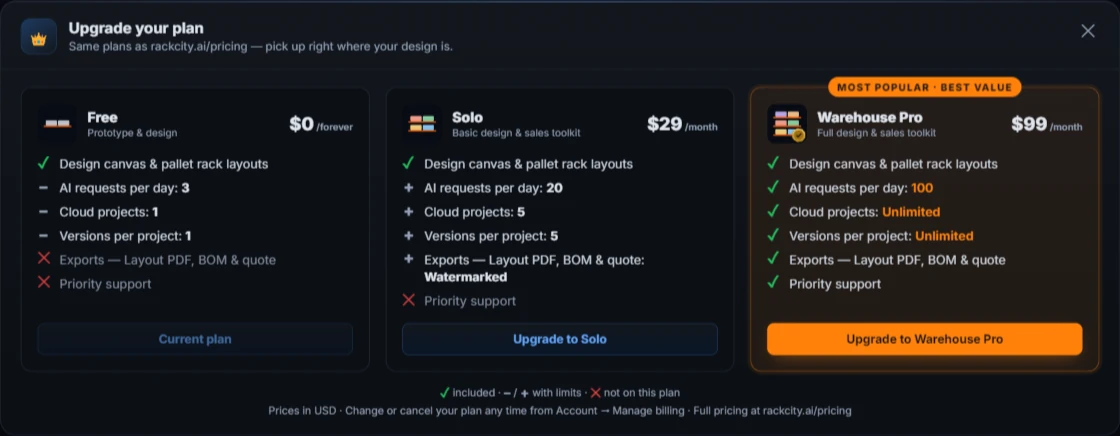
Three plans, one difference between them: how much RackCity AI you use. Every plan gets the whole design canvas — the building, the column grid, the zones, the bay editor, Suggest Layout, the summary and the material list. What the paid plans add is capacity: more AI requests a day, more cloud projects and versions, and exports.
Free — $0
For prototyping, learning the tool, and the occasional layout. The full design canvas and pallet rack layouts, a daily allowance of AI requests, and one cloud project with one saved version. No card, ever. If you lay out a building now and then and want to see the pallet count, Free is the plan.
Solo — $29 a month
For one person doing this as part of their job — an independent dealer, a broker who lays out a few buildings a month, an operator planning their own floor. 20 AI requests a day, 5 cloud projects with up to 5 versions each, and exports: the layout PDF, the BOM as CSV or Excel, and the quote PDF. Solo exports carry a small rackcity.ai watermark — a mark on each page of a PDF and a banner line in a spreadsheet.
Warehouse Pro — $99 a month
For the full-time designer or salesperson whose week is made of layouts. 100 AI requests a day, unlimited projects and versions, clean exports with no watermark — what you hand to a client under your own name — and priority support: a person who answers, first.
Prices are in U.S. dollars, billed monthly, and you can cancel at any time. The complete comparison, feature by feature, is on the pricing page.
If You've Been Using RackCity AI Already
If you created an account during the preview, here is exactly what v1.4 means for you. Your account is now on the Free plan, and:
- Nothing you saved is removed. Every project, every version and every file you exported is still in My Projects. You can open, edit, re-save and download all of it on the Free plan — even if you have more projects or versions than Free would let you create today. The limits only apply to creating new ones.
- New exports need Solo or Warehouse Pro. The Export button is still on the toolbar; on Free it tells you which plan unlocks it. Files you exported before v1.4 stay attached to their versions and download as before.
- Free includes a daily allowance of AI requests. Generating a layout from a description or a flyer is one request, and so is each edit you ask Forky AI for. Everything you do by hand — drawing zones, editing bays, Suggest Layout, the material list — is unlimited on every plan. The counter under Ask Forky AI shows what you have left today; it resets daily.
- One cloud project on Free. If you already have more, they all stay and all open; Save keeps overwriting the version you have open. Creating another project is what needs Solo.
Your founding-member rate
If you created your account during the preview, before plans launched, you have a founding-member rate: 50% off Solo or Warehouse Pro for your first 3 months — $14.50 or $49.50 a month, then the regular price. It's applied automatically at checkout, no code needed; you'll see the discount on the Stripe page before you pay. We said early on that early-access accounts would lock one in, and this is it. It applies to your first subscription, whenever you decide to start it.
If a limit lands in the wrong place for the way you work, tell us at support@rackcity.ai. These are the first plans, not the last word on them.
Upgrading and Managing Your Plan in the App
Billing lives where your work is. You never leave the app to pay, and you never lose the design you're working on when you do.
Your plan, on the toolbar
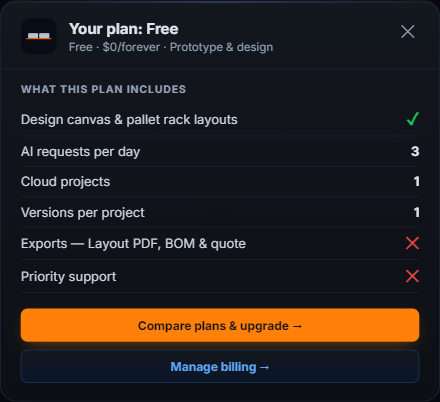
Next to the theme toggle, the toolbar now shows your plan and an Upgrade button. Click the plan to see everything your account includes — and, on a paid plan, when it renews. Click Upgrade to open the three plan cards side by side, right over your design.

Checkout in a new tab, back on your plan in seconds
Pick Solo or Warehouse Pro and Stripe Checkout opens in a new tab — pay by card or a wallet where your browser offers one — while your design stays exactly where it was in the original tab. When Stripe confirms the payment, the checkout tab shows your new plan and closes itself, and back in RackCity AI the toolbar reads the new plan and a banner confirms it. Exports and the higher allowances are live at once; nothing to reload.
Account → Manage billing
Click your plan on the toolbar and choose Manage billing to open your Stripe billing portal: change your card, download invoices, switch between Solo and Warehouse Pro, or cancel. A cancellation takes effect at the end of the month you've already paid for — you keep the plan until then — and moving from Solo up to Warehouse Pro is a switch on the same subscription, prorated, never a second charge.
Enterprise, for Rack Sales Organizations
Above Warehouse Pro there is an Enterprise offer for rack sales organizations — dealers and distributors with a team of people quoting from RackCity AI. It starts with everything in Warehouse Pro for the whole team and adds what a sales organization needs around the design tool: a rack sales toolkit — a CRM for your pipeline, rack inspections, and more — exports under your own brand, custom integrations and feature work, dedicated onboarding and support, and NET 30 invoicing instead of a card.
Enterprise isn't a card on the pricing page with a price; it's a conversation, because every rack sales organization runs differently. If that's you, talk to us.
Smaller Improvements Worth Knowing About
- A pricing page. rackcity.ai/pricing lays out the four offers feature by feature, and every card on it hands you straight into the app on the plan you picked.
- A full minute with your first layout. Trying RackCity AI without an account? You now get a full minute with your generated layout before you're asked to create a free one.
- Straight to the canvas. Sign in with no saved projects and RackCity AI takes you straight to the start screen for a new design instead of an empty My Projects panel.
- The Ask Forky AI dock shows your allowance. The counter under Ask Forky AI now reads in your plan's terms — how many AI requests you have left today.
What's Next
Update, September 2026: the next release shipped — v1.5.0 adds six rack systems on the Free plan, a drawing-set Layout PDF, a 3D bay view and a 7-day free trial.
Solo and Warehouse Pro are the first two plans, and the plans will move as we learn where the limits should sit. The subscriptions fund what's next:
- More rack types. RackCity AI models selective racking today — single-deep, back-to-back and double-deep. Cantilever, drive-in and push-back are on the way; ask Forky AI for one now and it will tell you honestly that it can't build it yet.
- The rack sales toolkit. The CRM and inspection tools in the Enterprise offer are being built with our first rack-dealer partners, around the way they actually sell.
- Forky AI reading more of the drawings you actually get. Most of the building documents uploaded to RackCity AI aren't tidy rectangular flyers — they're L-shaped buildings, rack drawings, and metric sheets. Reading those well is the next job for the flyer reader.
Frequently Asked Questions
Do I have to pay to keep using RackCity AI?
No. The Free plan is free for good: the full design canvas, pallet rack layouts, pallet counts, the material list, a limited number of AI requests and one cloud project. The paid plans — Solo at $29 a month and Warehouse Pro at $99 a month — add exports, more AI requests a day and more cloud projects. You only need one if you export files or want more than the Free allowances.
What happens to the projects and files I already saved?
Nothing is removed. Every project, version and exported file you saved during the preview stays in My Projects, and you can open, edit, re-save and download all of it on the Free plan — even if you have more projects or versions than Free would let you create today. The limits only apply to creating new ones.
Which actions count as AI requests?
Generating a layout from a description or from a building flyer is one request, and each edit you ask Forky AI for — "widen the aisles to 12 ft", "add a demising wall" — is one more. Drawing and editing by hand, Suggest Layout, the bay editor and the material list are not AI requests and are unlimited on every plan. The counter under Ask Forky AI shows what's left.
How do I cancel, and is there a refund?
Cancel any time from Account → Manage billing in the app, which opens your Stripe billing portal. You keep your plan until the end of the month you've already paid for and are not charged again. Fees for a billing period that has already started aren't refunded; the details are in the Terms of Service, and support@rackcity.ai is there if something looks wrong.
I'm on Solo — can I move up to Warehouse Pro mid-month?
Yes. Click Upgrade and pick Warehouse Pro; Stripe switches your existing subscription and prorates the difference for the rest of the month, and the new allowances apply as soon as the switch is confirmed. Moving back down happens at the end of the period, from Manage billing.
Why are Solo exports watermarked?
Solo is priced for one person who needs the numbers — the layout PDF, the BOM and the quote — for their own work. Its exports carry a small rackcity.ai mark on each page of a PDF and a banner line in a spreadsheet. Warehouse Pro exports are clean, which is what you want when the document goes to a client under your own name.
Is there a plan for my whole team?
That's the Enterprise offer: Warehouse Pro for everyone on the team, the rack sales toolkit, exports under your brand, and invoicing. Email us and we'll set it up around how your team sells.