In this guide
The Problem with Site Comparisons Today
A tenant is weighing three industrial buildings. All three have the zoning, the dock count and asking rents within a dollar of each other. The question that will actually decide it — how many pallet positions each one holds — takes days to answer through the normal channel, because the normal channel is a racking contractor who has to draw it.
A fast contractor comes back in two or three days. Three buildings means three drawings, or three contractors, and a tenant on a deadline in a tight market may not give you the window. Meanwhile the spec sheets say 70,000, 120,000 and 180,000 sq ft, which tells the tenant almost nothing about what they can store.
RackCity AI, which we build, gives you the number in about two minutes a building — not a rule of thumb, but a drawn layout of back-to-back racking on that building's dimensions, with the columns and docks taken out of the count.
Step 1: Get the Numbers for Each Building
Upload the building flyer
Every industrial listing has a marketing PDF: square footage, clear height, column spacing, dock doors, office build-out. Drop it on RackCity AI's start screen, pick the plan page and add fill it with back-to-back racking to the note — the building is read off the sheet and racked. If the flyer shows several units, add a note saying which one ("the 120,000 sq ft east unit") and the reader uses it.
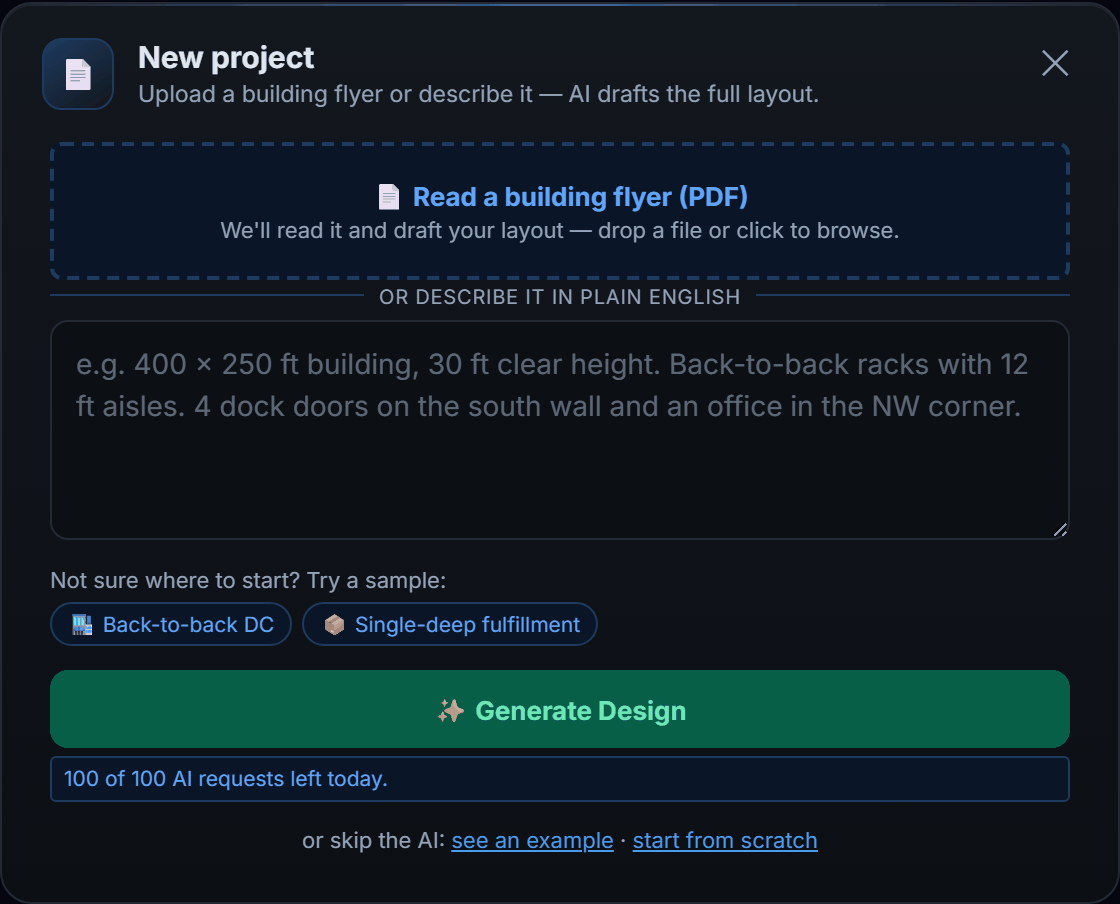
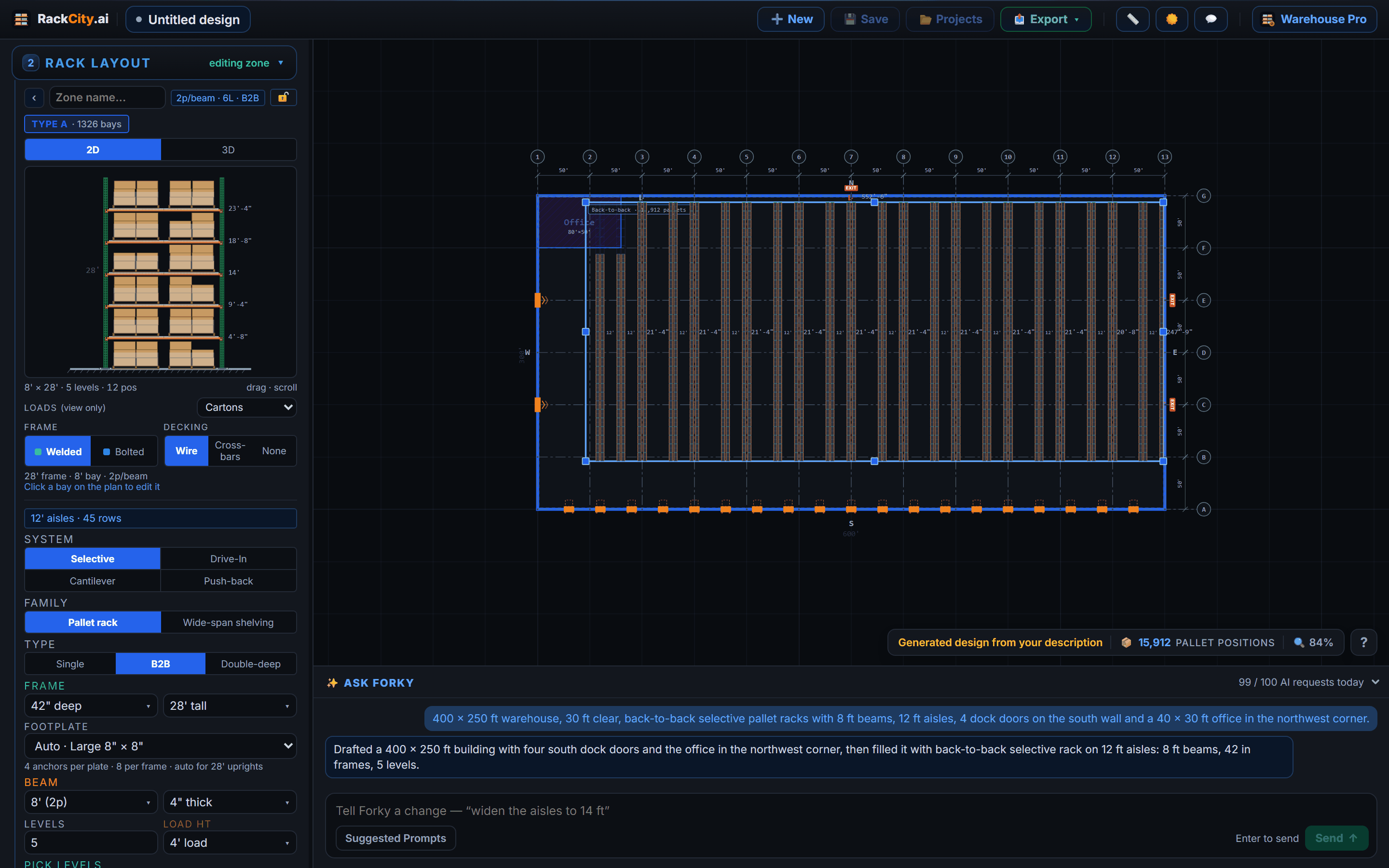
No flyer? Type the length, width and clear height, or describe the building to Forky AI in one sentence. Thirty seconds either way.
Read off the pallet count
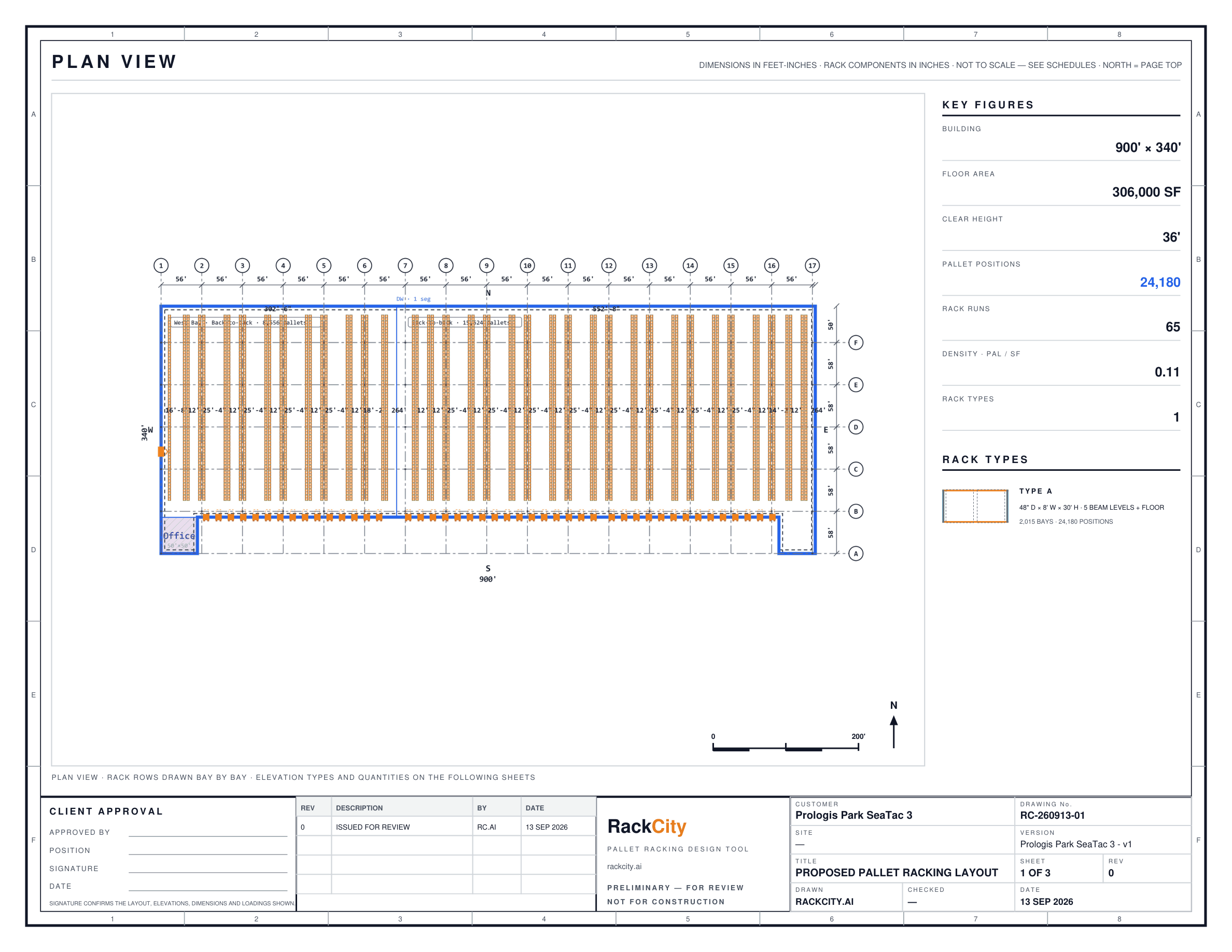
The header shows the total pallet positions for the building at a standard back-to-back configuration — 8 ft beams, 10 ft aisles, as many beam levels as the clear height allows — and the canvas shows where the rows land around the columns and the doors. If the tenant has told you their truck or their pallet, set the aisle and the beam to match and the count updates. Repeat for each building: three sites, three layouts, about ten minutes.

Step 2: Build the Site Comparison
| Building | Size | Clear Ht | Positions | Annual Rent/SF | Cost / Position / Yr |
|---|---|---|---|---|---|
| Site A | 350 × 200 ft (70,000 sq ft) | 28 ft | ~5,000 | $8.50 | $119 |
| Site B | 400 × 300 ft (120,000 sq ft) | 32 ft | ~10,900 | $9.25 | $102 |
| Site C | 600 × 300 ft (180,000 sq ft) | 36 ft | ~18,000 | $7.75 | $78 |
Cost per position per year is annual rent divided by the positions the building holds. Putting it beside the square footage turns "how big is it?" into "how much can I store, and what does each pallet slot cost me a year?" — which is the question the tenant's CFO is going to ask anyway.
It also makes clear height visible, which a rent-per-foot comparison hides. Site B costs 9 % more per square foot than Site A and 14 % less per pallet, because 32 ft clear takes a fifth beam level. A 200,000 sq ft building at 36 ft clear will hold about as many pallets as a 300,000 sq ft building at 24 ft, at two-thirds of the rent. Tenants who stack high should be shopping on clear height first, and this table is how you show them.
Step 3: Show the Tenant a Layout
Before the tour, export the Layout PDF for each building — the top-down plan with the rack zones, the aisle widths and the position counts on it — and bring it. A tenant holding a floor plan walks the building differently: they are looking at where their pick aisles meet the dock doors, not wondering whether the building works at all. If they want to see how other operations lay out a similar footprint, the layout examples show eight with their counts.
Many tenants don't know how many positions they need. Draw their current building the same way — dimensions, their racking — and you have their present capacity as a baseline. Then each candidate reads against it: "Site C gives you 40 % headroom over what you have now."
The Pitch to the Tenant
You are not a racking contractor, and you are not offering a binding quote or a stamped drawing. What you are showing is this: "On the dimensions in the marketing package, here is a realistic layout and a realistic count of what you would be renting."
That is a different service from the one most brokers offer. They hand the tenant a spec sheet. You hand them a floor plan with a number on it.
Every export carries the line that dimensions and quantities must be field-verified before ordering, so there is no ambiguity about what the document is: a planning tool for the LOI stage, not an order form. The verification walk is the natural next step, and you are the one who set it up.
Handling Common Questions
"What if our racking config is different from what you modeled?"
The layout is a starting point, not a commitment. Change the beam length, the frame height or the aisle in the panel and the count updates on the spot; you can run the tenant's own spec with them in the room. If they use reach trucks and 9 ft aisles, say so and watch the number go up.
"What if the building has more columns than the flyer shows?"
Say so, and note that the count will tighten on the site walk. Once you have the real column spacing, drop it onto the layout's column grid — you can paste the bay widths straight off the architect's drawing — then turn on Bury Columns (new designs start with it off) and the rows re-place so the columns land in the flue. The verification line on the export covers the gap in the meantime.
"Can you get us a racking quote before we sign the lease?"
RackCity AI's Bill of Materials counts the frames, beams and decks from the layout, and a fill at a market figure per pallet position turns it into a ballpark total — enough to stress-test the economics before an LOI, not enough to order from. A racking dealer does the priced quote after the lease; hand them the project and they start from your layout instead of from nothing.
Frequently Asked Questions
How accurate are pallet position counts from a building flyer?
Within 5–15 % of what a contractor would count, when the flyer's dimensions are right. Columns the sheet doesn't show, a sprinkler line lower than the eave height suggests, or a dock apron the drawing omits all take positions off. A site walk with a tape tightens the number before anyone signs, and every export says on its face that it must be field-verified.
Can I compare buildings with different dock configurations?
Yes. Draw the dock doors on whichever wall they sit on and set how far the racking keeps clear of them; a building with twenty doors along the south wall gives up more floor to staging than one with eight, and the count shows it. That is exactly the comparison a cross-dock tenant needs to see.
What clear height is needed for standard B2B pallet racking?
About 22–26 ft clear for four beam levels of 48 in loads; a fifth level wants 28–30 ft, a sixth 32–34 ft. Clear height is measured to the lowest obstruction — sprinkler heads, ducts, lights — not to the roof deck, and flyers sometimes quote the eave. RackCity AI checks the frame height and the beam levels against the clear height you enter.
How do I explain racking capacity to a tenant who doesn't know warehousing?
Show them the floor plan and point at the total. Each position holds one pallet; ask how many pallets they have today and the comparison makes itself. Cost per position per year — the rent divided by the count — puts three buildings on one scale without either of you needing to know a beam from a frame.
Can I save and reuse layouts for multiple showings?
Yes. Save each building as a cloud project and it is there in My Projects from any browser, with its versions and the PDFs you exported attached. Keep one per listing in your pipeline and every site tour starts with a floor plan already drawn. The Free plan holds one project; Solo holds five, Warehouse Pro as many as you list.